

In-depth guide
Compare and decide
The details: how the bot and the AI differ, setup, costs, and how we compare.
How does WhatsApp booking work in Blyssbook?
A client messages your salon's WhatsApp number. The bot answers within seconds, offers the services you have switched on for online booking, then the free times from your live calendar. When the client confirms, the booking is created in your calendar and the client gets the confirmation in the same chat. Your team can read every conversation in the inbox and take over at any point.
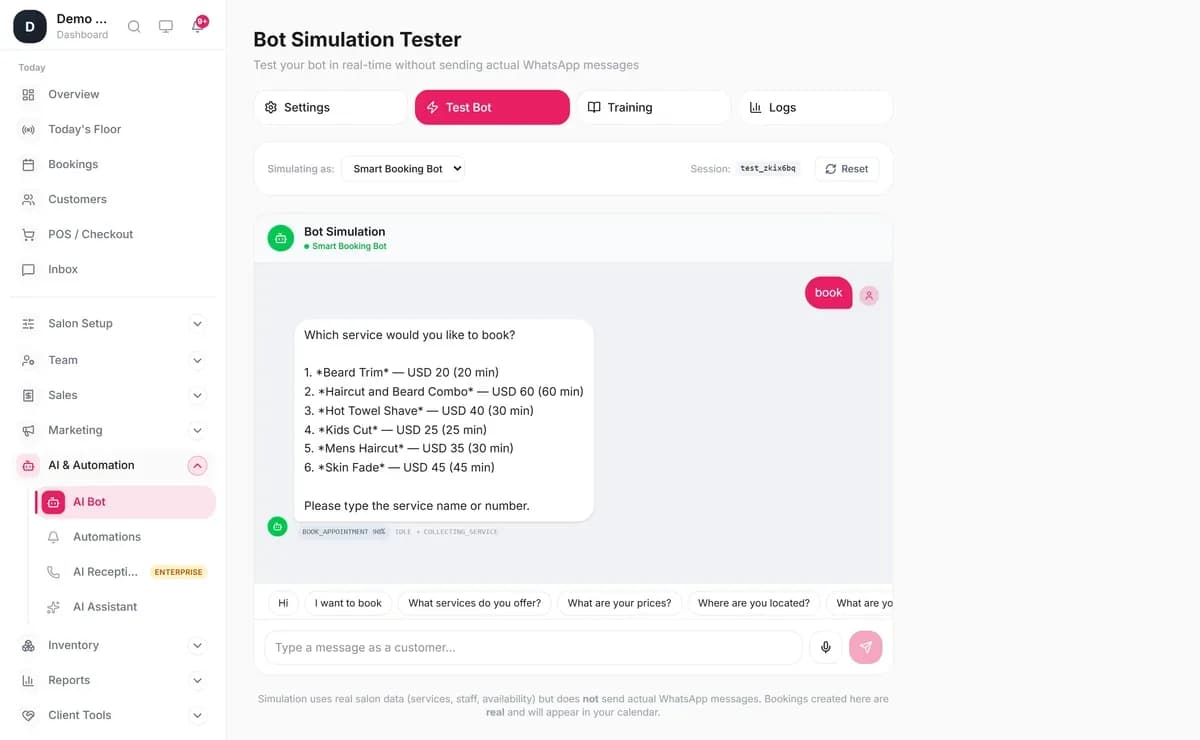
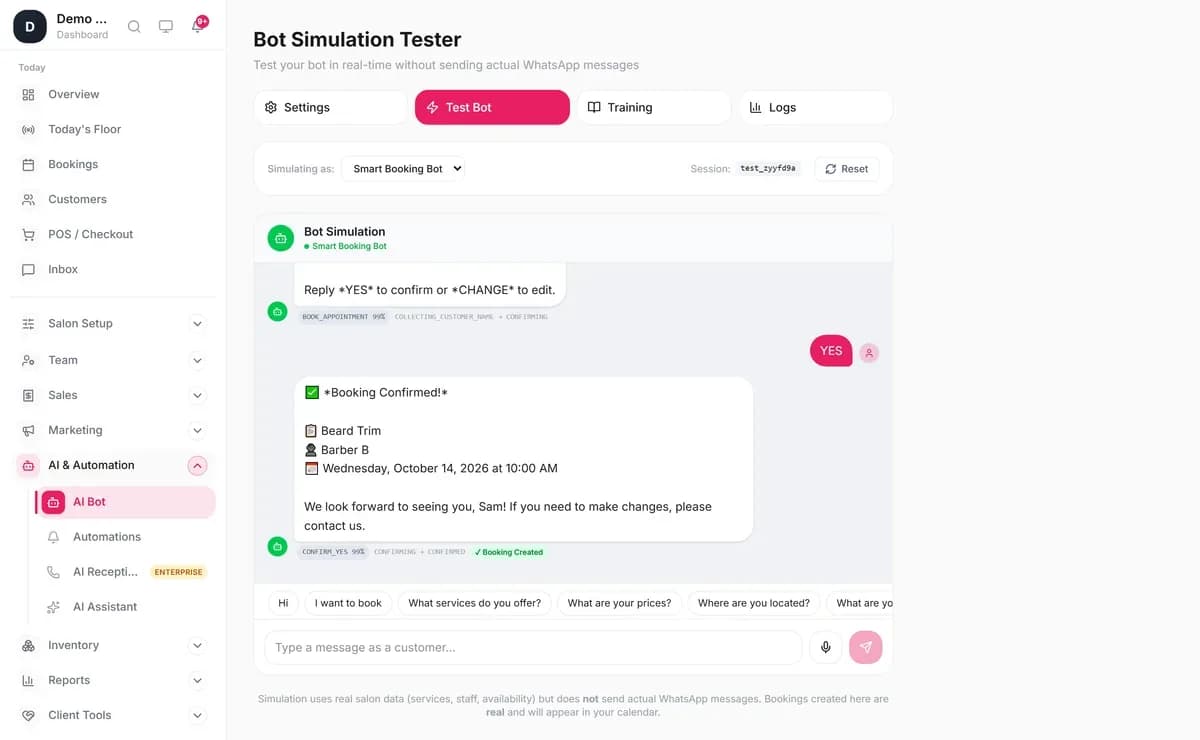
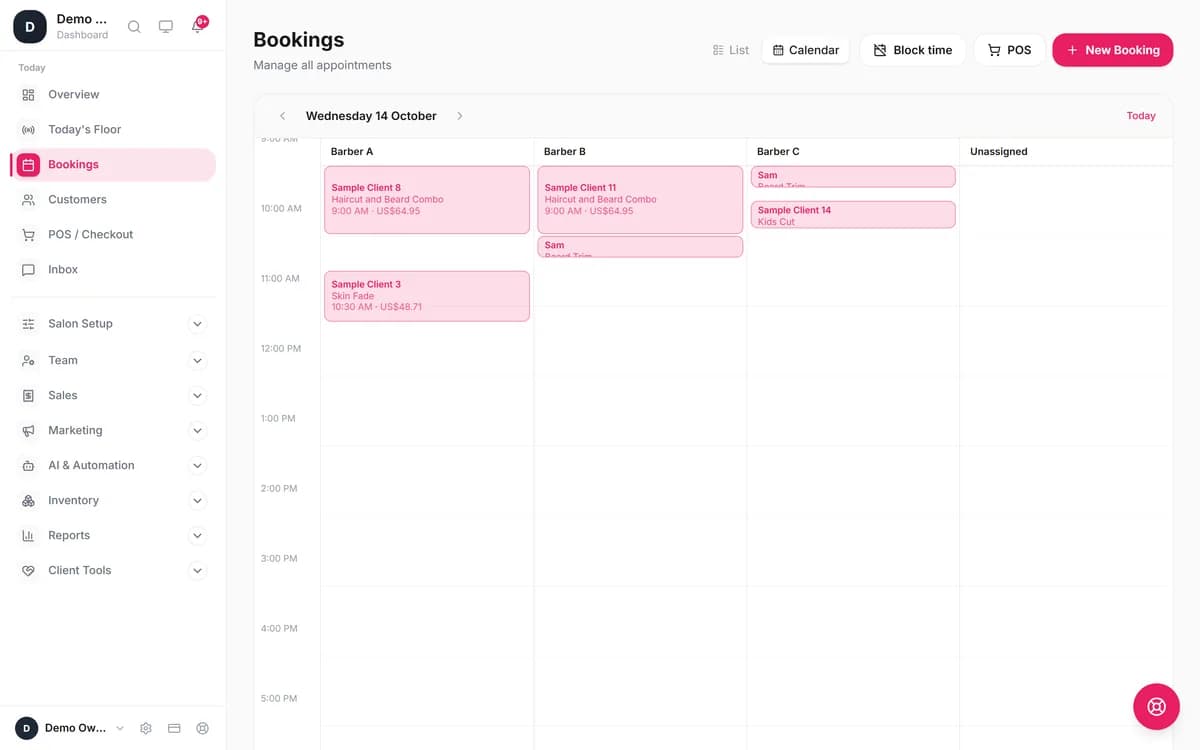
What is the difference between the Smart Booking Bot and the AI assistant?
The Smart Booking Bot follows fixed steps and keywords, so it is predictable and works on Starter. The AI assistant (called Advanced AI Bot in the app) reads ordinary messages, so a client can write "can I get a fade with Ali on Thursday after 5?" and get an answer. You choose the mode in AI & Automation → AI Bot → Bot Mode.
| Smart Booking Bot | AI assistant (Advanced AI Bot) | |
|---|---|---|
| Plan | All plans, from $11 | Professional and up, from $21 |
| How it understands | Keywords and numbered menus (BOOK, SERVICES, HOURS, LOCATION, HUMAN), shown as tap buttons or lists | Normal sentences, typos and mixed questions |
| New bookings | Yes: service, staff (optional), day, up to 6 free times, then YES (or sí in Spanish) to confirm | Yes, with a summary the client confirms first |
| Move or cancel a booking | No; it asks for the details and your team does it | Yes, the client's own bookings, inside your cancellation notice |
| Prices, hours, location, staff | Yes, from your salon settings | Yes, plus your knowledge base (policies, FAQs) |
| Voice notes | Passed to your team | Transcribed and answered, with a voice reply if you switch it on |
| Languages | English, Arabic and Spanish | Replies in the client's language |
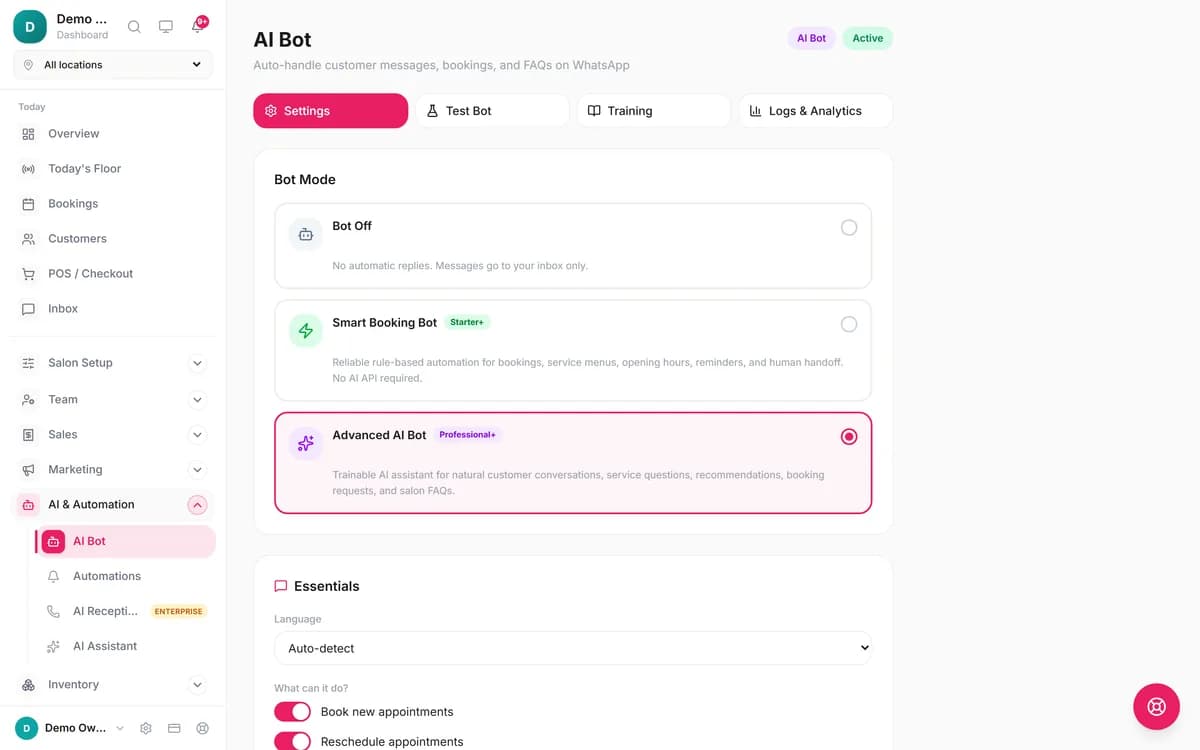
What does the AI WhatsApp booking assistant do?
It works from your real data. It checks availability, prepares a booking, finds the client's existing appointments, and moves or cancels them. Anything that changes your diary is two steps: the assistant shows a summary and only acts when the client says yes. Cancelling and moving work on WhatsApp only, for bookings made from that phone number, and respect your cancellation notice (24 hours unless you change it).
Voice notes are transcribed, so your team can also read them in the inbox. With Reply to voice notes with a voice note on, a client who sends a voice note gets a spoken answer back, as long as it is short and has no link in it. Otherwise the reply is text.
You can chat with it yourself on our live AI booking assistant demo, set up for a sample salon. Nothing you book there is saved.
How do you train it on your menu, prices and policies?
Your services, prices, team, opening hours and address come from your salon settings automatically. For everything else, open AI Bot → Training and add knowledge-base entries in categories such as FAQ, Pricing, Policies, Location, Hours, Memberships and Packages. The Auto-Generate from Salon Data buttons write a service menu, staff list and cancellation policy entry for you to edit.
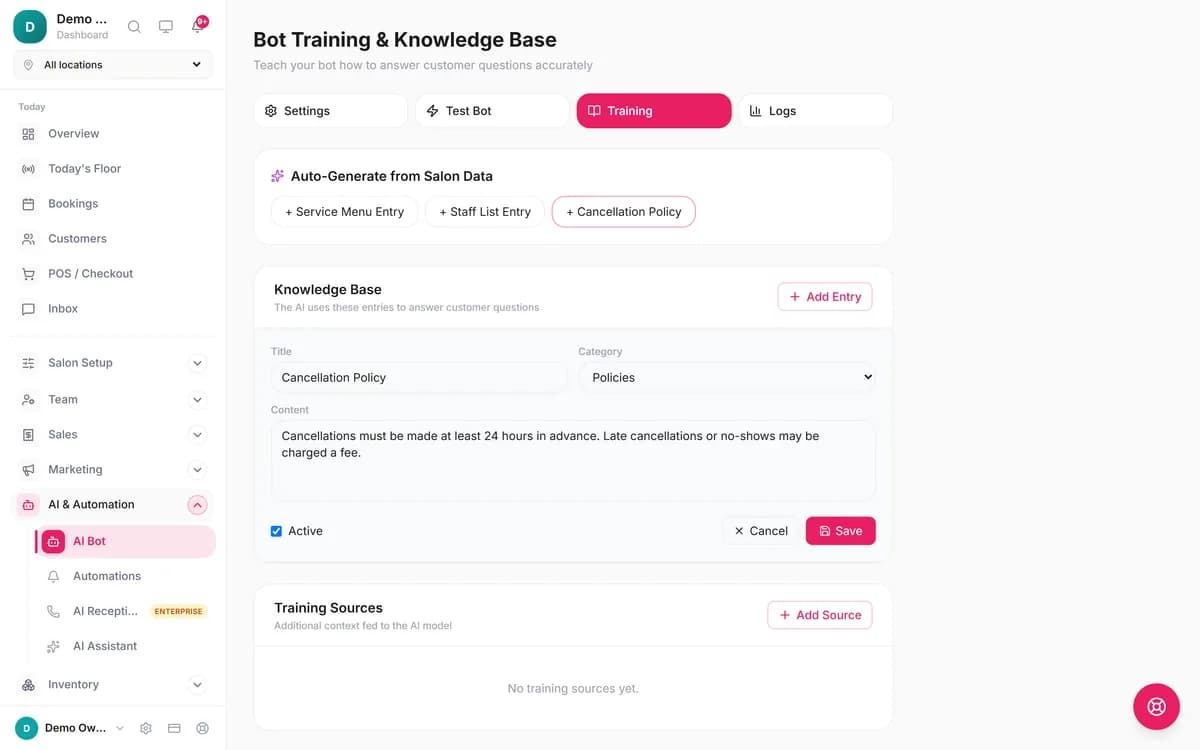
It has guardrails. The assistant is told never to invent services, prices, staff, times, discounts or policies, and never to say something is booked unless the booking went through. Replies that look like medical or legal advice, or that quote a price or staff name you don't have, are blocked and logged. Use the Test Bot tab to try awkward questions before you switch it on.
When does the bot hand a chat over to your team?
When the client asks for a person ("human", "manager", "call me", the Arabic موظف, or the Spanish "quiero hablar con una persona"), when the bot fails to understand a few times in a row (you set the sensitivity: Low, Medium or High), or when a photo or video arrives that it can't read. The chat shows as Needs human in Inbox, the bot goes quiet for that client, and it stays off until someone switches it back on.
If a staff member simply replies, from the inbox or from the WhatsApp Business app on the phone, the bot pauses for that chat for 12 hours and then picks up again. The inbox holds WhatsApp, Messenger and Instagram chats together, with filters for Unread, Needs human and Bot active.
We plan to publish how many WhatsApp conversations the bot finishes without a person, and how many WhatsApp bookings arrive outside opening hours. On 12 October 2026 we had too few live salons to meet our threshold of 10 salons and 1,000 bookings per figure, so those numbers will follow.
How do you connect your salon's WhatsApp number?
- Go to Salon Setup → WhatsApp & Channels.
- Choose Connect Your Current WhatsApp Number to keep using the WhatsApp Business app on your phone, or Connect a New WhatsApp Number for a number that isn't on WhatsApp yet.
- Sign in with Facebook in the Meta pop-up and pick or create your WhatsApp Business account. A new number may need a one-time verification code in WhatsApp Manager.
- Open AI & Automation → AI Bot, choose a bot mode, and send a few test messages in Test Bot.
- On Professional, open Automations and tap Turn on the essentials: booking confirmation, 24-hour reminder and review request.
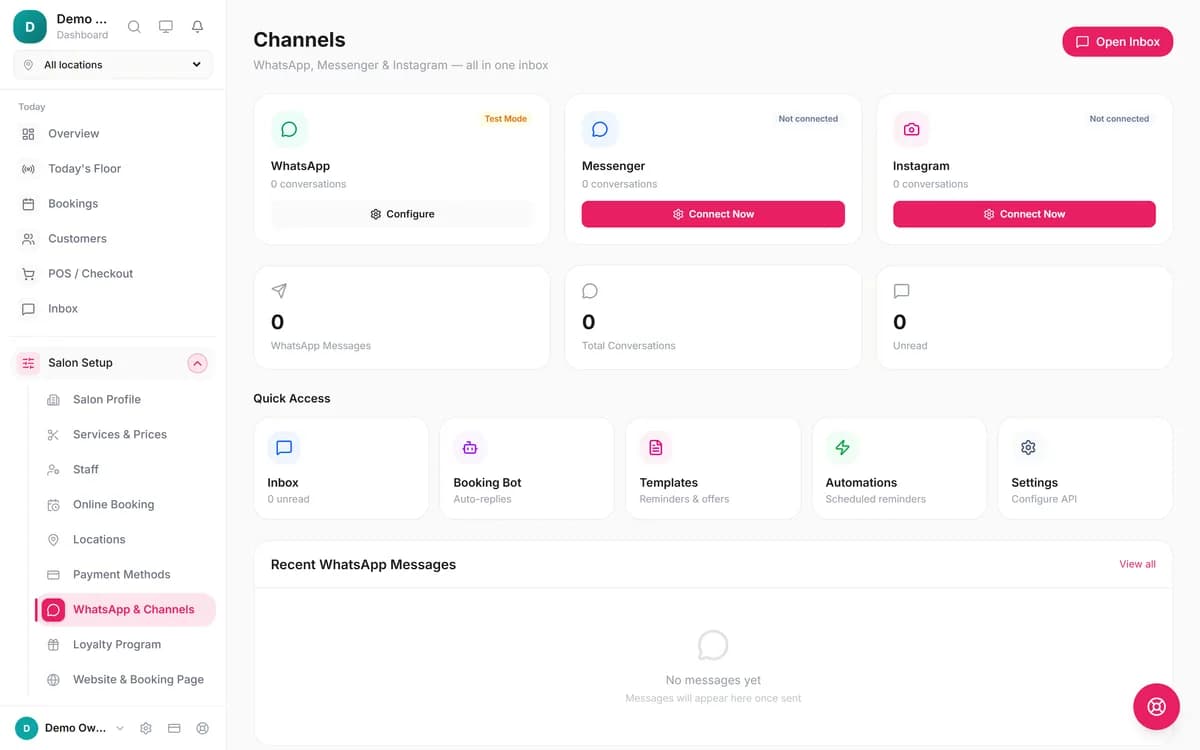
Keeping your current number (Meta calls it coexistence) syncs your contacts and recent chat history, and messages you send from the phone appear in the inbox. On a coexistence number, catalogues, marketing templates, status updates and group chats aren't available through Blyssbook. Salons that already use Twilio or 360dialog can connect through Advanced setup instead.
Which reminders and automated messages are included?
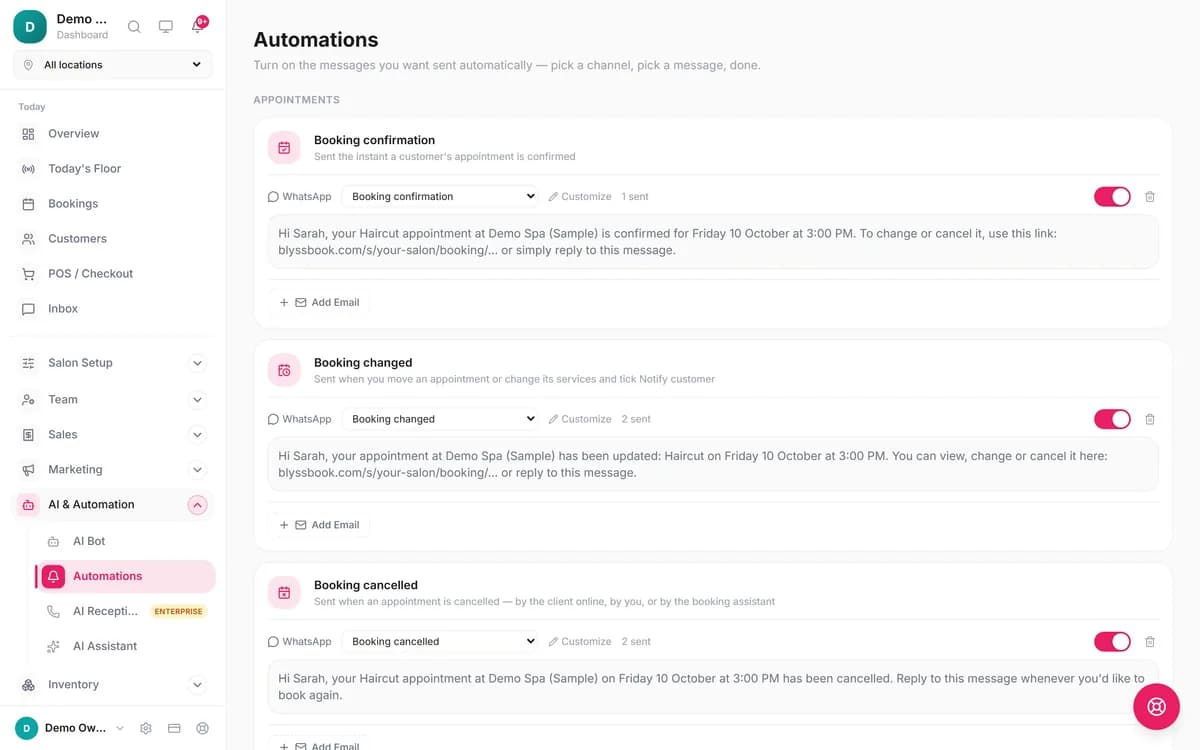
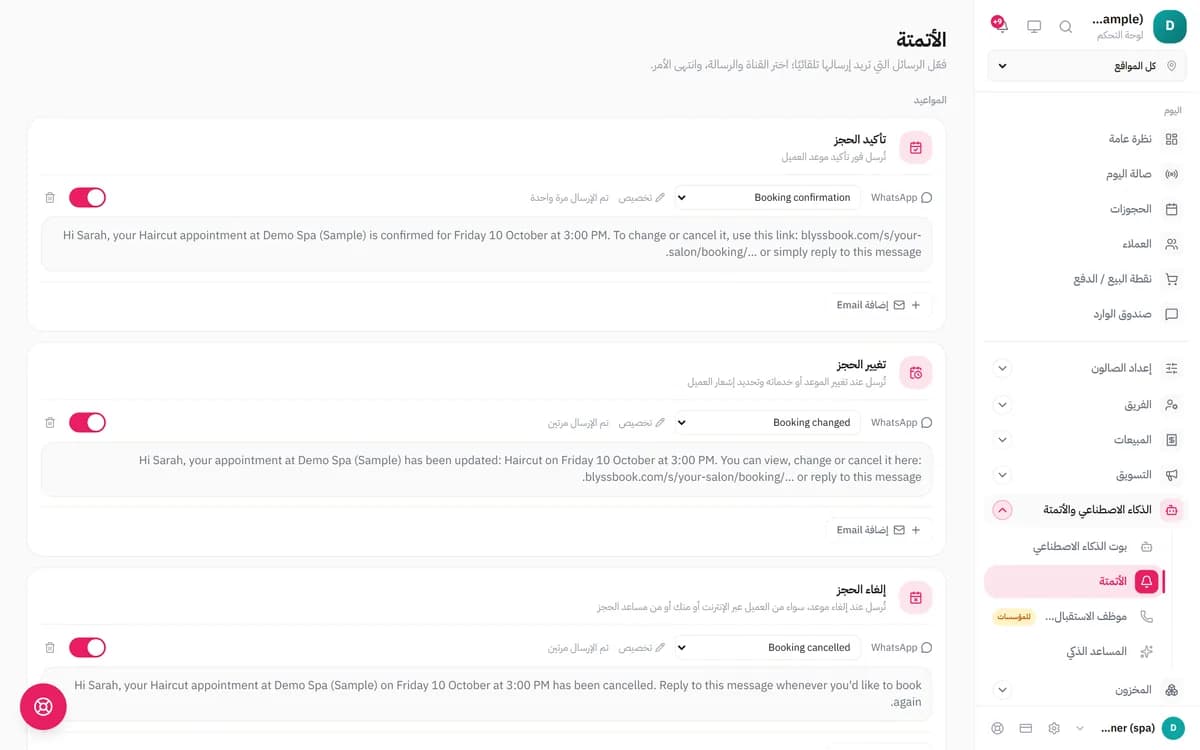
Automated WhatsApp messages start on Professional. On Starter the bot confirms bookings inside the chat, but no automated WhatsApp messages or reminders are sent. There are 12 automations, each with a ready-written message in English, Arabic and Spanish that Blyssbook submits to Meta for approval when you switch it on:
- Booking confirmation
- Booking changed
- Booking cancelled
- Welcome a new customer
- Reminder the day before (24 hours)
- Reminder a couple of hours before (2 hours)
- Missed appointment follow-up
- Thank you after the visit
- Ask for a review
- Birthday treat
- We miss you (30 days)
- We miss you (60+ days)
Clients who opt out of WhatsApp are skipped, birthday and win-back messages also need marketing consent, and a booking made in a bot chat doesn't get a second confirmation. For timing and wording, read how to send WhatsApp appointment reminders.
What does WhatsApp cost on top of Blyssbook?
Blyssbook doesn't charge per message or cap WhatsApp messages on any plan. Meta charges separately, per delivered template message[1]. Replies inside the 24-hour window after a client messages you are free, and so are utility templates (such as a reminder) sent inside that window. Marketing templates, such as birthday and win-back messages, are always charged. Meta bills through Meta Business Suite, and rates depend on the client's country.
The AI assistant runs on Blyssbook's AI allowance: 15 million tokens a month on Professional, 30 million on Enterprise. If it is used up, chats fall back to the Smart Booking Bot until the next cycle.
Can clients book through Instagram and Messenger too?
Yes, and the same bots answer there. Connect them on the Channels page with Connect Messenger & Instagram; they are rolling out salon by salon, so you may need to ask us to switch them on. Instagram and Messenger don't share the client's phone number, so the bot asks for it before booking, and the AI assistant can't move or cancel bookings there. You can also put your booking page link in your Instagram bio.
How does Blyssbook compare with Salonist, Rekaz and Whautomate?
| Software | WhatsApp booking | AI on WhatsApp | Public price |
|---|---|---|---|
| Blyssbook | Rule-based bot books into the calendar on every plan | Included on Professional and up | $11, $21 or $49 a month |
| Salonist[2] | "WhatsApp Integration" and unlimited WhatsApp/SMS notifications from the Advance plan | "AI Receptionist & WhatsApp AI Agent" add-on, priced by conversation volume on a quote | USD 59, 109 or 179 a month |
| Rekaz[3] | WhatsApp for confirmations and reminders; no WhatsApp booking bot mentioned | Not stated | Yearly subscription; no price on the page |
| Whautomate[4] | Appointments and chatbots listed as products | "Automate responses with AI" | Not readable on the pricing page when we checked |
Where they may suit you better
- Rekaz lists Mada, Apple Pay and deferred payment through Tamara or Tabby on its salon page. Blyssbook takes online payments only through your own Stripe account, never inside the WhatsApp chat, and Stripe isn't available to Saudi businesses.
- Salonist connects WhatsApp through providers such as Interakt, AiSensy and Zoko, and includes SMS notifications from its Advance plan. Blyssbook sends text reminders only through your own Twilio or Telnyx account.
- Whautomate is built around messaging across many channels, which may suit a business that wants marketing broadcasts first and booking second.
What Blyssbook's WhatsApp booking doesn't do (yet)
- No deposits or payment links inside the WhatsApp chat. Deposits work on the online booking page (Professional and up) through your own Stripe account, and Stripe isn't available in Saudi Arabia.
- No automated WhatsApp reminders on Starter.
- The Smart Booking Bot can't move or cancel an existing booking, and starts in English until you set Language to Spanish, Arabic or Auto-detect.
- No voice-note replies during the free trial, and none on Starter.
- Clients without WhatsApp can get email or text reminders instead.
- The bot doesn't yet follow the "business hours only" and off-hours reply settings; it answers around the clock.
- Instagram and Messenger are still rolling out.
Which plan do you need?
| Plan | Price | WhatsApp features |
|---|---|---|
| Starter | $11/month (AED 39, SAR 39, £9, PKR 2,999, INR 999) | WhatsApp connection, Smart Booking Bot, human handoff, inbox |
| Professional | $21/month (AED 79, SAR 79, £16, PKR 5,999, INR 1,999) | Adds the AI assistant, voice replies, bot training, the 12 automations and WhatsApp campaigns |
| Enterprise | $49/month (AED 179, SAR 184, £37, PKR 13,999, INR 4,699) | Adds a doubled AI allowance, up to 10 branches and the AI phone receptionist |
See the pricing page for plans. The free trial is 14 days with no card. For a step-by-step on running bookings through WhatsApp by hand first, read our WhatsApp booking guide for salons.
More questions
Can clients book salon appointments on WhatsApp automatically?
Yes. Once your WhatsApp number is connected, the bot replies to every message, shows free times from your calendar and creates the booking when the client confirms. Bookings land in the calendar like any other, marked as coming from the WhatsApp bot.
Which plan includes the WhatsApp AI bot?
Professional ($21 a month, AED 79, £16) and Enterprise ($49). Starter ($11) includes the rule-based Smart Booking Bot but not the AI assistant, and doesn't send automated reminders.
Does it understand voice notes?
On Professional and up, yes. The AI assistant transcribes the voice note, answers it, and can reply with a voice note of its own. During the free trial it replies in text. On Starter, a voice note is passed to your team in the inbox.
Can it reply in Arabic, Urdu or Spanish?
The rule-based bot replies in English, Arabic or Spanish. It starts in English; in the bot settings, set Language to Spanish or Arabic, or to Auto-detect so it follows the language the client writes in. The AI assistant is set to answer in the language the client writes in, so it handles other languages as well as the underlying AI model does. Try your clients' languages in the Test Bot before you go live.
Do I need the WhatsApp Business API?
You need a WhatsApp Business account connected through Meta, which is what the API is. Blyssbook sets it up for you: you sign in with Facebook in a pop-up and pick or create the account. If you already use the WhatsApp Business app, you can keep using it on the same number.
What's the best platform for bookings over WhatsApp and Instagram?
Look for one that books into a real calendar from both channels and keeps the chats in one inbox. Blyssbook connects WhatsApp on every plan and runs the same bots on Instagram and Messenger, which are rolling out salon by salon. On Instagram the bot asks for a phone number before it books.
What happens if the bot doesn't know the answer?
It hands the chat to your team. The conversation is marked Needs human in the inbox, the bot stops replying to that client, and it stays off until a staff member switches it back on.
Related features and guides
- Salon POS with tipsCheck out the bookings WhatsApp brings in, with tips and split payments.
- AI phone receptionistThe same idea for phone calls, on Enterprise.
- WhatsApp Business for salonsThe full guide to running a salon on WhatsApp.
- How to send WhatsApp remindersWording and timing for reminders that cut no-shows.
- حجز صالون عبر واتساب (بالعربية)This page written for salons in Saudi Arabia and the Gulf, with prices in SAR.
- Reservas por WhatsApp (en español)This page for salons in Spain, with prices in euros.
- Salon software in the UAEPrices in AED and how Gulf salons use WhatsApp.
- Salon software in PakistanPrices in PKR for salons that already book on WhatsApp.
By Sam Rahman, Salon Operations & Content · Updated 13 October 2026
Written by Sam Rahman from Blyssbook setups and product testing. Conversations and screens are from fictional demo salons in the app's Test Bot, 12–13 October 2026; no real client data. Product facts checked against the app and the plan table on 13 October 2026. Competitor and Meta facts are from their public pages on 13 October 2026 (sources below).
Sources
- [1] Meta, WhatsApp Business Platform pricing: https://developers.facebook.com/docs/whatsapp/pricing/, checked 13 October 2026.
- [2] Salonist pricing: https://www.salonist.io/pricing, checked 13 October 2026.
- [3] Rekaz salon management page: https://rekaz.io/home/en/salon-management/, checked 13 October 2026.
- [4] Whautomate pricing: https://www.whautomate.com/pricing, checked 13 October 2026.
WhatsApp, Instagram, Messenger, Facebook and Meta are trademarks of Meta Platforms. Salonist, Rekaz and Whautomate are trademarks of their owners and are mentioned only to compare products. Blyssbook is not affiliated with them.