

In-depth guide
Compare and decide
The details: checkout step by step, tips and payroll, cash-up, hardware, how we compare with Square, Vagaro and Fresha, and what the till does not do yet.
How does checkout work in Blyssbook?
Open POS / Checkout in the sidebar (it sits under Today, next to Bookings). The left panel has four tabs: Bookings, Walk-in, Services and Products. The right panel is the bill. A typical checkout takes four steps:
- Pick the booking. The Bookings tab lists unpaid appointments from the last 30 days and the days ahead. You can also start from a booking's menu (Checkout (POS)) or from Today's Floor (Send to POS). A visit with several services checks out as one invoice.
- Add anything extra. + Add service for a service done on the day, + Add product for retail. Each line keeps the staff member who did it or sold it.
- Apply a discount or tip. Type a discount amount, then tap a tip: 10%, 15%, 20% or Custom.
- Take payment. Choose one method, or tap Split payment and add a row per method. Then tap Charge.
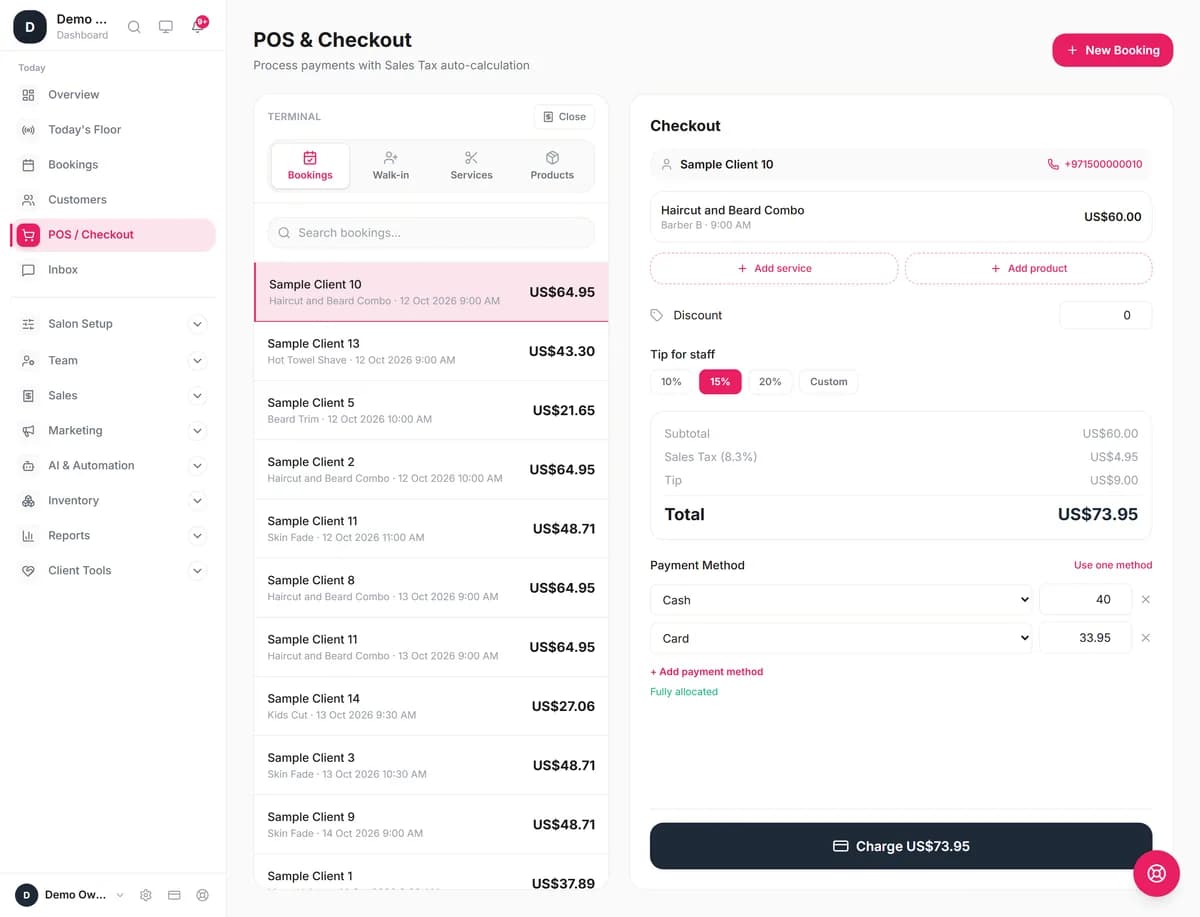
Tax is off until you switch it on in Settings → Invoices & taxes, where you type its name (VAT, GST, Sales Tax, IVA or anything else) and its rate. It is worked out on the subtotal after the discount. The tip is added after tax and isn't taxed. If you only check out walk-ins, the Walk-in tab creates the booking and opens the bill in one go.
The same screen works in Arabic (right to left) and Spanish, so front-desk staff can use their own language.
Which salon software has built-in tipping?
Blyssbook has tipping built into checkout on every plan. Tap 10%, 15% or 20% (worked out on the bill after any discount, before tax) or tap Custom and type an amount. The tip prints on the receipt and the invoice, and the Analytics page totals it separately from sales.
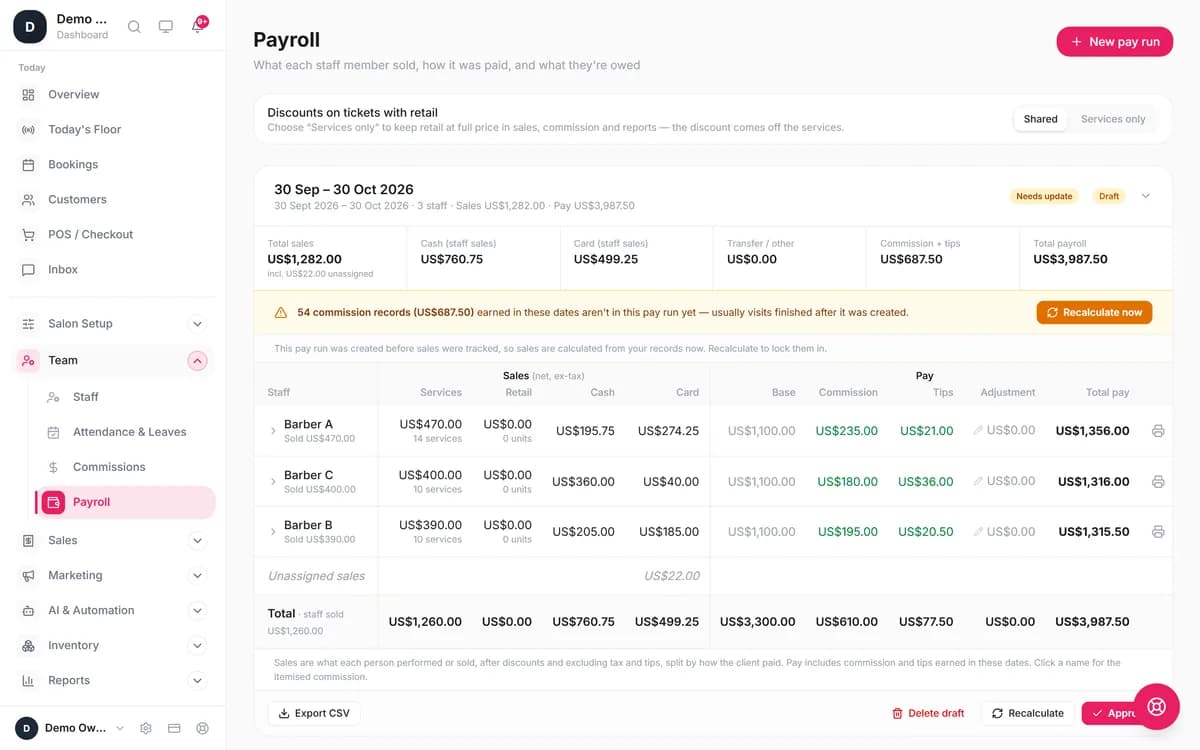
Who gets the tip: Blyssbook splits it evenly, to the cent, between the staff who did the services on that bill. Someone who only sold a retail product isn't in the split. There is no screen to divide a tip unevenly, so if your salon shares tips another way, adjust it in the pay run.
On Professional and up, tips flow into payroll. Each pay run shows base pay, commission and a separate Tips column per person, and you can export it as CSV. If a tip was keyed wrong, Edit sale on the invoice corrects it and the payroll line follows.
Can you split a payment between card and cash?
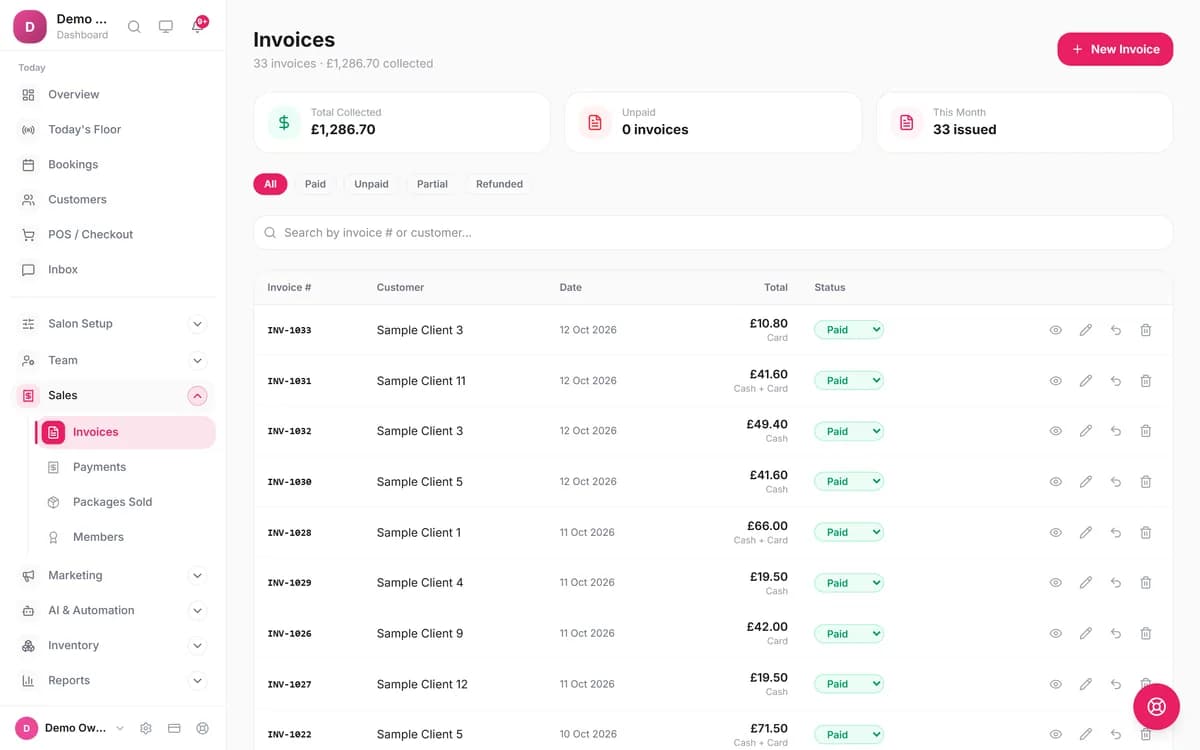
Yes. After Split payment, each row is a method and an amount, and the screen shows what's left to allocate. Charge stays locked until the rows add up. The invoice records every part, so your Invoices list shows "Cash + Card" and the end-of-day totals know how much cash should be in the drawer.
We wanted to publish how Blyssbook salons pay by country (how much is cash in Pakistan against card in the UK). On 12 October 2026 we had too few live salons to meet our own threshold of 10 salons and 1,000 invoices per figure, so we haven't. We'll add it once the sample is big enough.
Can you redeem packages and give discounts at the till?
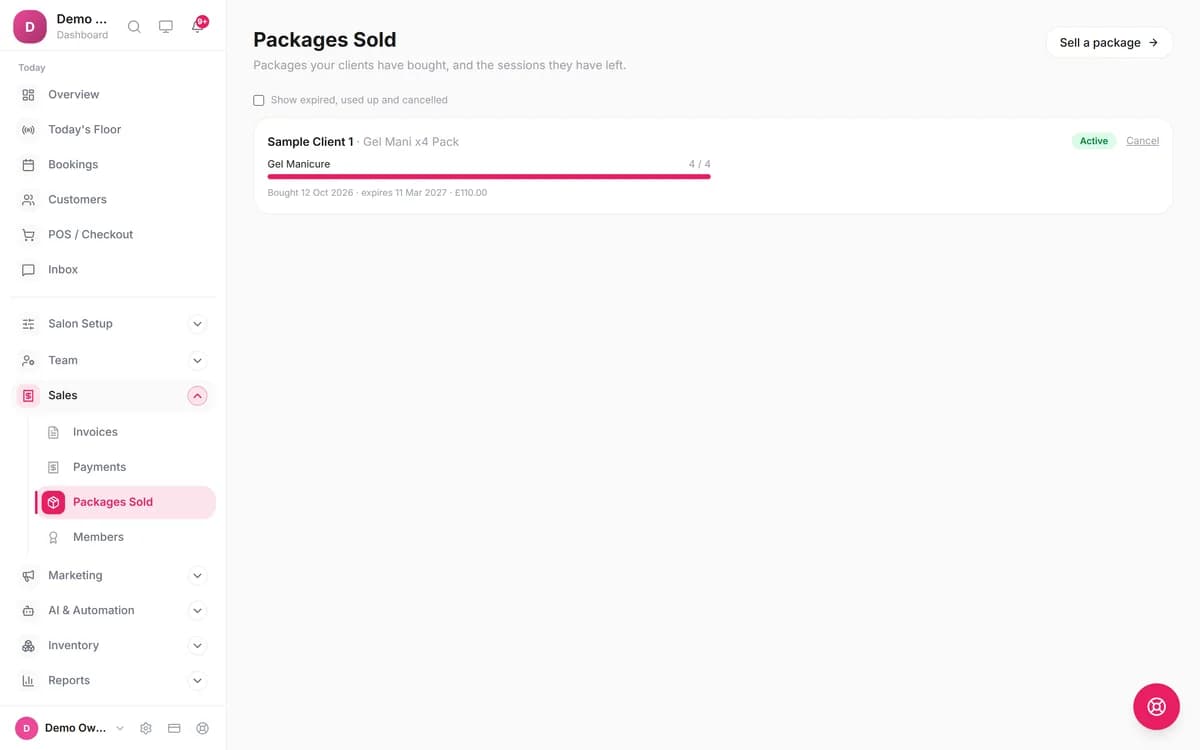
Yes, with some plan limits. If the client owns a prepaid package (Professional and up), the bill shows Redeem from (package) (sessions left). One tap sets that service to zero and takes a session off the pack. Membership and loyalty-tier discounts, and loyalty points, appear in a Customer rewards box on the same bill.
Manual discounts are one amount off the whole bill. Each role has a discount limit (receptionists default to 10%). Above it, the button changes to Ask a manager and a manager enters a PIN. The same PIN step guards refunds and voids.
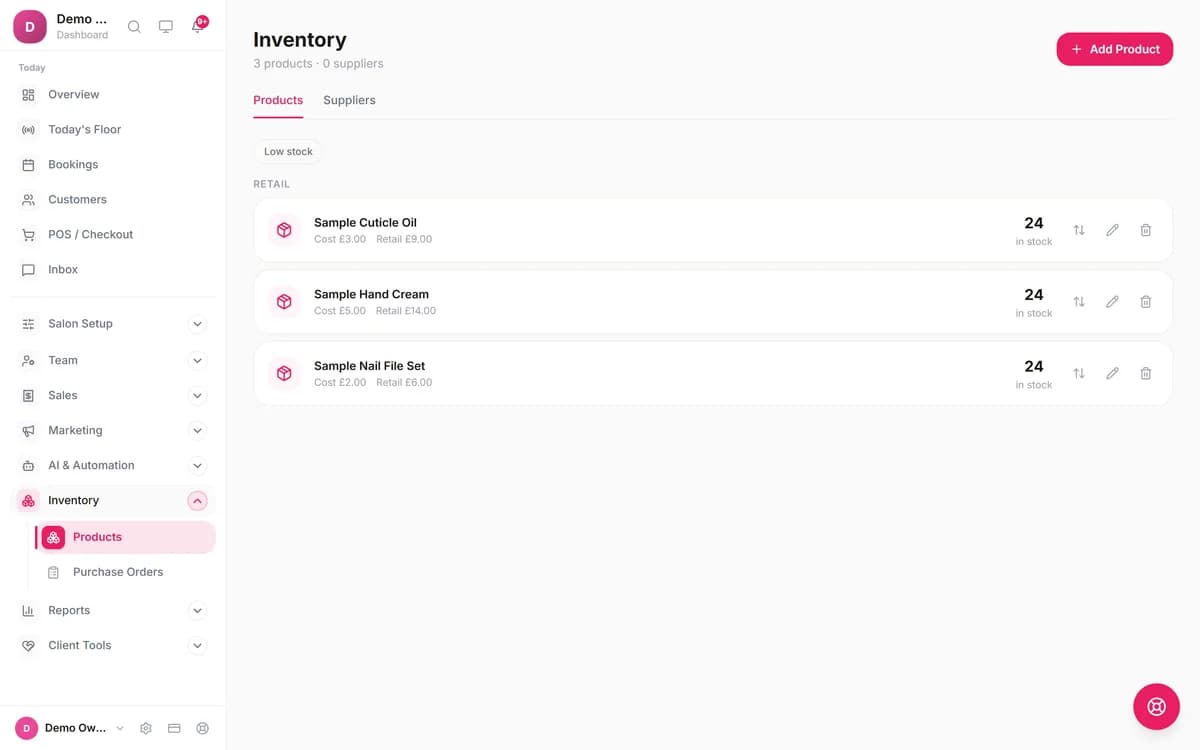
Does the POS track retail stock?
Yes. Products sold at the till come off stock in the same step as the invoice, and you can't sell more than you have. A refund puts them back. Each product has a low-stock level (default 5) and the Inventory page has a Low stock filter. Starter holds 50 products, Professional 200 and Enterprise unlimited. With more than one branch on Enterprise, stock is kept per branch.
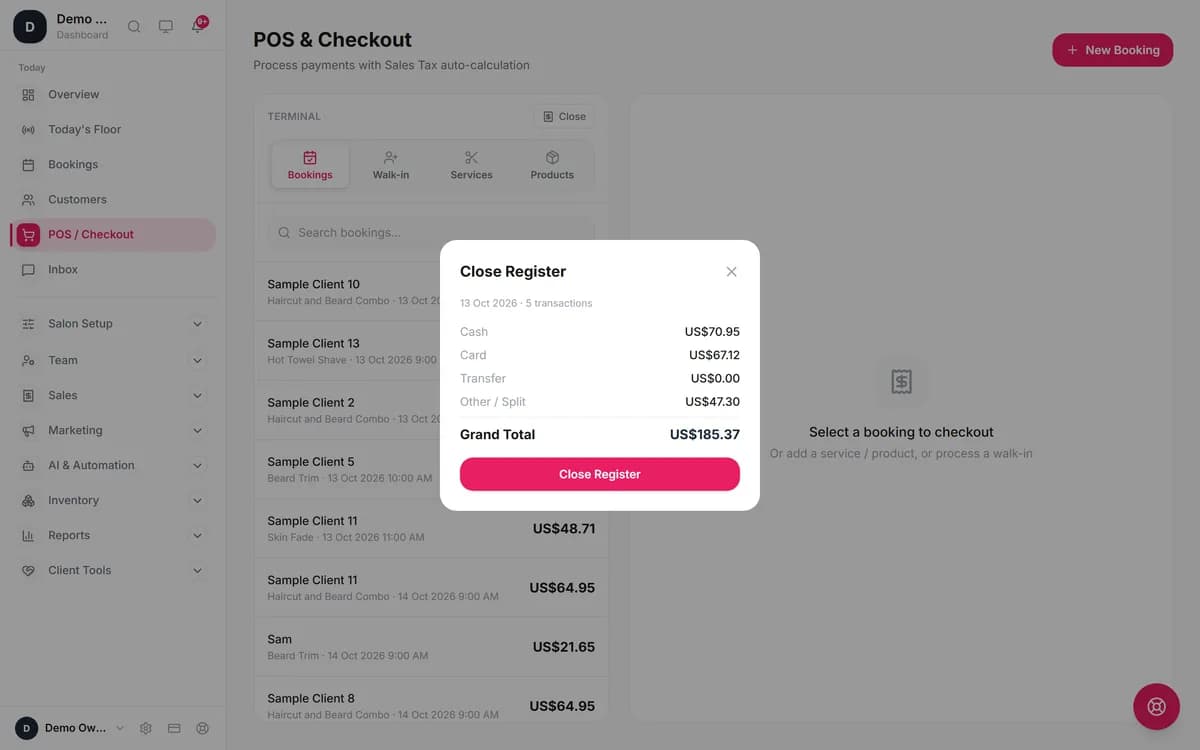
How do you cash up at the end of the day?
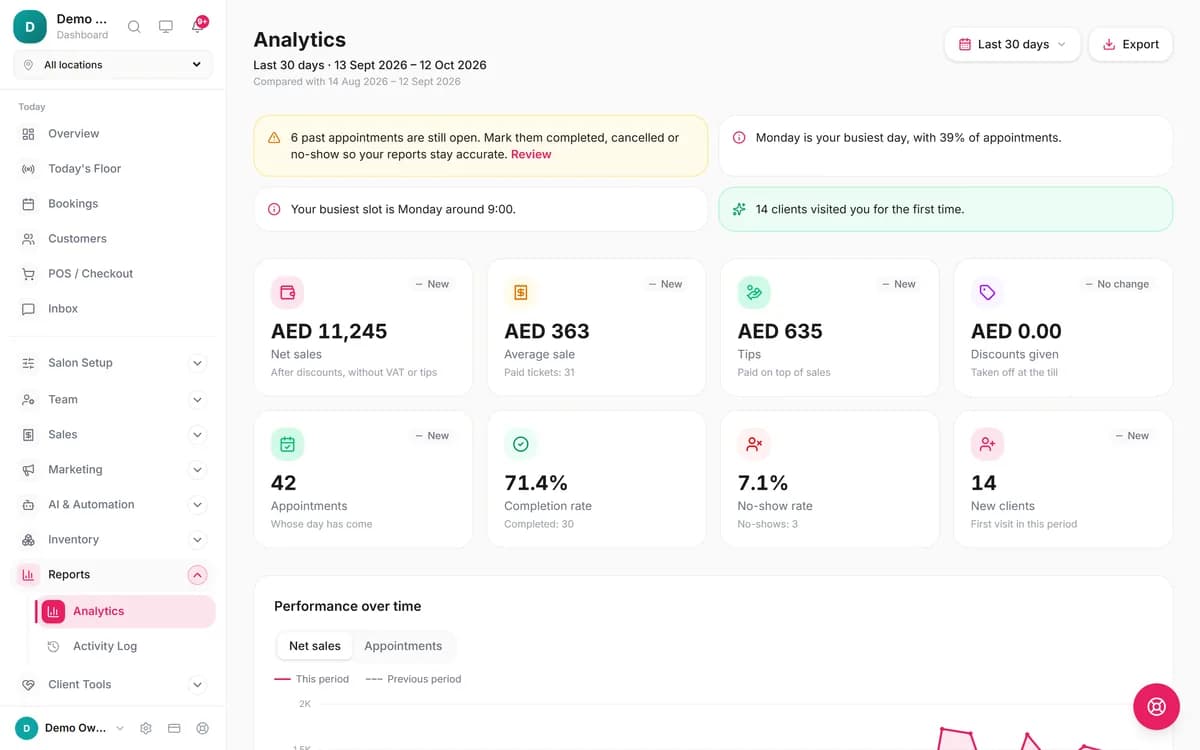
Tap Close Register at the top of the POS. It totals the day's paid invoices by Cash, Card, Transfer and Other / Split, then saves the closing with who closed it. If someone uses Edit sale on that day afterwards, Blyssbook warns that the cash-up no longer matches. For longer periods, Reports → Analytics shows how clients paid, tips, discounts, refunds and VAT collected, with daily summary, services and team exports as CSV.
What hardware do you need?
- A screen. Any tablet, laptop or phone with a modern browser, or the Blyssbook app for Android.
- A receipt printer (optional). Print Receipt opens your browser's print dialog with a layout for 80 mm thermal paper. There is no direct printer or cash-drawer integration.
- A card machine (if you take cards). Use the one you have from your bank or provider and record the payment as Card. Blyssbook doesn't sell or connect card terminals at the till.
Does it suit nail salons, barbers and spas?
Nail salons: several techs on one client
Each service on the bill has its own tech, so commission and the tip split follow the work. See nail salon software.
Barber shops: walk-ins straight to the till
Walk-ins join the Waiting column on Today's Floor and go to the POS with Complete → POS when the cut is done. See barber shop software.
Spas: package sessions at checkout
Clients on a course of treatments redeem a session at checkout instead of paying again. See spa management software.
How does Blyssbook's POS compare with Square, Vagaro and Fresha?
| Software | Monthly price on its public page | Card processing | Hardware |
|---|---|---|---|
| Blyssbook | $11, $21 or $49; POS on all three | None at the till; you record payments taken on your own machine | Any browser; no hardware sold |
| Square[1][2] | Tiers listed, but no prices in the page text when we checked | In person: 2.6%, 2.5% or 2.4% + 15¢ depending on plan | Square's own readers and registers |
| Vagaro[3] | $30.00 (shown as $23.99 for the first 6 months), plus $10 per extra calendar, up to seven | Through Vagaro Merchant Services; rates not stated on the pricing page | "Free card reader" with Vagaro Merchant Services |
| Fresha[4] | Independent plan per month, Team plan per team member; USD price not shown to us (the page localises) | "Card payment processing" listed as an add-on, no rate stated | Not stated on the pricing page |
Where Square, Vagaro or Fresha may suit you better
- You want the card charged inside the POS. Square and Vagaro process cards themselves, so there's no second device and no keying the amount twice.
- You want matching hardware. Square sells its own readers and registers built for its software.
- You want a marketplace to send you new clients. Fresha lists your salon on its marketplace, for a one-time fee on brand-new clients who find you there.
Blyssbook suits you better if you already have a card machine, take a lot of cash, want tips and commission worked out for payroll, or need the till in Arabic or Spanish.
How much does the POS cost?
| Plan | Price | POS features |
|---|---|---|
| Starter | $11/month (AED 39, £9, PKR 2,999) | Checkout, split payment, tips on receipts and reports, discounts, invoices, close register, 50 products |
| Professional | $21/month (AED 79, £16, PKR 5,999) | Adds tips and commission in payroll, package, membership and loyalty redemption, 200 products |
| Enterprise | $49/month (AED 179, £37, PKR 13,999) | Adds up to 10 branches with stock and receipt details per branch, unlimited products |
Plans are on the pricing page. There is no fee per transaction.
What the POS doesn't do (yet)
- No card processing or card-terminal integration at the till.
- No emailed or WhatsApp receipts. Print, or save the invoice as PDF.
- No gift cards, vouchers or promo codes at checkout.
- No barcode scanning at the till, and no cash-drawer integration.
- Close Register totals the day by method. It doesn't take an opening float or a counted-cash figure, so you compare the drawer yourself.
- Tips split evenly between service staff only. Uneven splits are a payroll adjustment.
- No offline mode.
More questions
Which salon software has built-in tipping?
Blyssbook does, on every plan: 10%, 15%, 20% or a custom amount at checkout. The tip prints on the receipt and is split evenly between the staff who did the services. On Professional and up it lands in each person's Tips column in payroll.
What is a salon POS system?
It's the till for a salon: the screen where you turn a finished appointment into a paid bill. A salon POS differs from a shop till because it starts from the booking, knows which stylist did each service, and feeds that into tips, commission and client history.
Can I split a payment between card and cash?
Yes. Tap Split payment and add a row per method and amount. Charge stays locked until the rows add up, and the invoice records the mix, for example Cash + Card.
Do I need special hardware?
No. The POS runs in a web browser on a tablet, laptop or phone, and in the Android app. Receipts print on any printer your browser can use, laid out for 80 mm thermal paper. Card payments are taken on your own card machine and recorded in the POS.
Is there a free salon POS?
Not from us. There is no free plan; the POS comes with Starter at $11 a month. You can try every feature free for 14 days without a card.
Does the POS work for nail salons with several techs on one client?
Yes. Each service keeps its own tech, so a gel manicure with one tech and a pedicure with another check out as one ticket, with commission per line and the tip split between both techs.
Can tips be paid out to staff automatically?
Blyssbook doesn't move money. On Professional and up, each tip is recorded against the staff who did the services and added to their line in the pay run, next to base pay and commission. You approve the pay run and pay staff the way you already do.
Can the POS email or WhatsApp a receipt?
Not yet. You can print the receipt, or open the invoice and save it as a PDF from the browser's print dialog. Sending receipts by email or WhatsApp isn't built.
Related features and guides
- WhatsApp booking for salonsClients book on WhatsApp; the booking arrives at the till ready to check out.
- All Blyssbook featuresEvery feature with the plan it needs.
- PricingPlans from $11 a month, with a 14-day free trial.
- Salon POS buying guideWhat to check before you choose any salon POS.
By Sam Rahman, Salon Operations & Content · Updated 13 October 2026
Written by Sam Rahman from Blyssbook setups and product testing. Screenshots are from fictional demo salons, taken 12–13 October 2026. Product facts checked against the app and the plan table on 13 October 2026. Competitor facts are from each vendor's public pages on 13 October 2026 (sources below).
Sources
- [1] Square, payment processing fees (US): https://squareup.com/us/en/payments/our-fees, checked 13 October 2026.
- [2] Square Appointments pricing (US): https://squareup.com/us/en/appointments/pricing, checked 13 October 2026.
- [3] Vagaro pricing: https://www.vagaro.com/pro/pricing, checked 13 October 2026.
- [4] Fresha pricing: https://www.fresha.com/pricing, checked 13 October 2026.
Square, Vagaro, Fresha, Cash App and Venmo are trademarks of their owners and are mentioned only to compare products. Blyssbook is not affiliated with them.