

Booker alternative
Simple to run. Simple to pay for.
Bookings, checkout, team pay and WhatsApp reminders for $11 to $49 a month. No contract, no setup fee, cancel any time.
- 14 days free, no card
- Bring your client list
- Prices checked Oct 2026
Booker is still on sale as Mindbody's spa and salon software, starting at $139.[2] For a large spa group, Boulevard (from $143) and Zenoti (quote only) are closer like-for-like options. For one to ten premium salons that want deposits, memberships and WhatsApp concierge messaging, Blyssbook costs $21 a month (Enterprise $49), with a 14-day trial and no card.
What happened to Booker, and does it affect you?
Nothing has been switched off. In June 2025 Mindbody, Booker and ClassPass moved under a new parent brand, Playlist, which said each business would "continue to operate as it does today".[4] On 13 October 2026, booker.com still sells Booker, with a footer reading Copyright 2026 MINDBODY, Inc.[1]
So you don't have to move. Switching makes sense if the monthly cost, the text limits on the lower plans or the limits on Booker's texts are a problem for you. If none of those apply, staying is a reasonable choice.
What is the best alternative to Booker for premium salons?
For a premium salon, check six things in any vendor: a booking site in your brand, deposits at booking, memberships and packages, client notes and history, per-stylist commission, and personal two-way messaging.
- Boulevard is a US salon and spa platform with published prices close to Booker's. Essentials is $143 a month for one location, and Premier is $234 per location on a new-customer offer (normally $293).[6]
- Zenoti is aimed at large groups and enterprise spas, and sells by quote. See our Zenoti alternative comparison.
- Blyssbook suits one premium salon up to ten branches. It covers the six points above on Professional ($21) apart from multi-branch, which needs Enterprise ($49). It has no gift cards and no room booking.
If you're weighing Booker against its sister product, our Mindbody alternative page covers Mindbody itself.
How does Blyssbook compare with Booker, feature by feature?
| Booker (as of Oct 2026) | Blyssbook | |
|---|---|---|
| Who it's built for | Day spas, hotel spas, salons, barbershops, massage studios[1] | Salons, spas, nail studios and barbers, one location up to 10 branches |
| Published price | "Starting at $139"; higher plans not priced on the page[2] | $11, $21 or $49 a month |
| Plans | Starter, Accelerate, Ultimate, Enterprise (custom)[2] | Starter, Professional, Enterprise |
| Reminders | Text and email; Starter sends up to 3,000 texts[2] | WhatsApp and email, 24-hour and 2-hour (Professional and up). SMS through your own Twilio or Telnyx |
| Two-way messaging | Unlimited 2-way texting on Ultimate[2] | WhatsApp inbox on every plan |
| AI chat | Messenger[ai] chatbot, add-on on Accelerate and Ultimate[2] | Advanced AI WhatsApp bot (Professional and up); rule-based bot on Starter |
| Deposits and card payments | Integrated POS, "secure payments and Apple Pay"[3] | Deposits and card on file through your own Stripe (Professional and up); POS records card, cash and split |
| Memberships and packages | Yes[1] | Yes (Professional and up) |
| Gift cards | Yes[1] | No |
| Rooms and equipment | Yes[1] | No. One calendar column per staff member |
| Commissions and payroll | Payroll; tiered commission[3] | Commission rules, tips and pay runs (Professional and up) |
| Consumer app listing | Listing in the Mindbody app[3] | No consumer app. Your own booking page and WhatsApp |
| Moving your data in | Data migration support; conversion free for many data types[2] | Self-serve CSV client import; dedicated onboarding on Enterprise |
| Free trial | Not stated[2] | 14 days, no card |
"Not stated" means the public page doesn't say. It doesn't mean Booker lacks it. Booker also notes that not all features are available in all regions or on all tiers.[2]
What does a premium client journey look like in Blyssbook?
These screens are from a demo spa we set up in the live product, following one client from booking to membership.
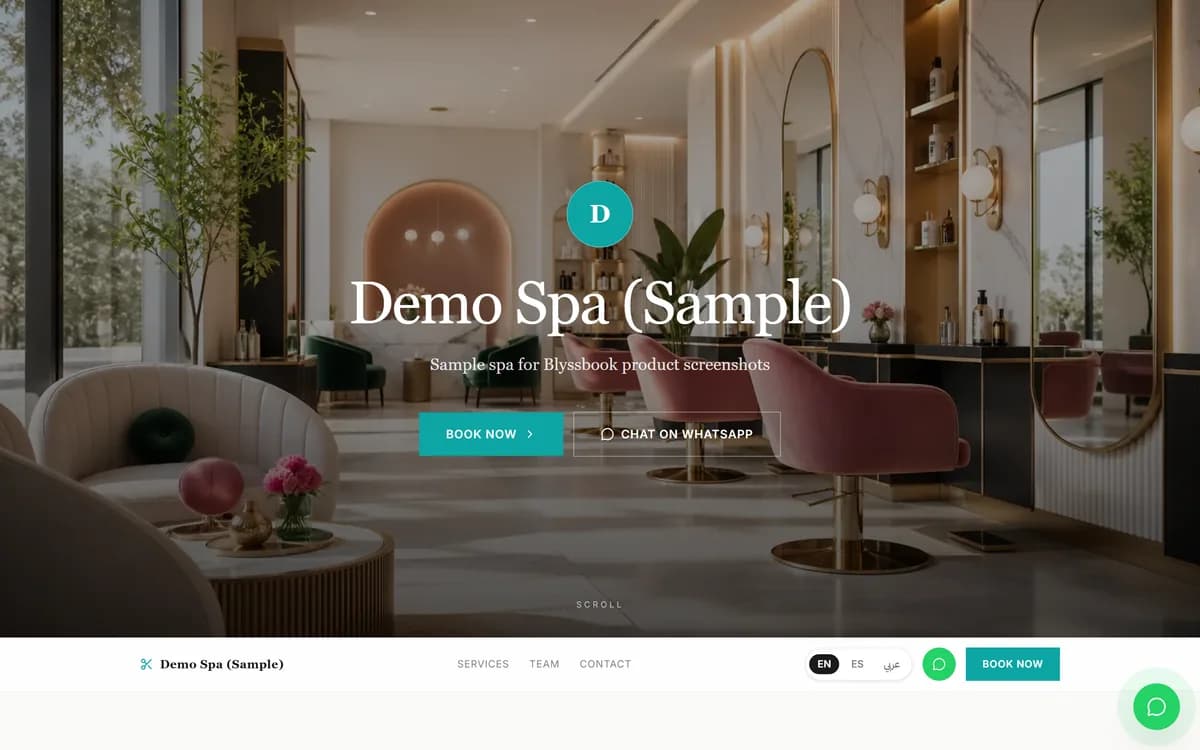
1. A booking site in your own look
The client lands on your site, in English, Spanish or Arabic, and books online or taps Chat on WhatsApp. On Professional you can put it on your own domain and use the premium themes.
2. A deposit to hold the slot
Connect your own Stripe account under Salon Setup → Payment Methods, then set the deposit and no-show rules under Salon Setup → Online Booking. The slot is held for 30 minutes while the client pays, and the booking confirms only once Stripe confirms payment. You can also take a card on file and charge a no-show fee from the booking (Professional and up).
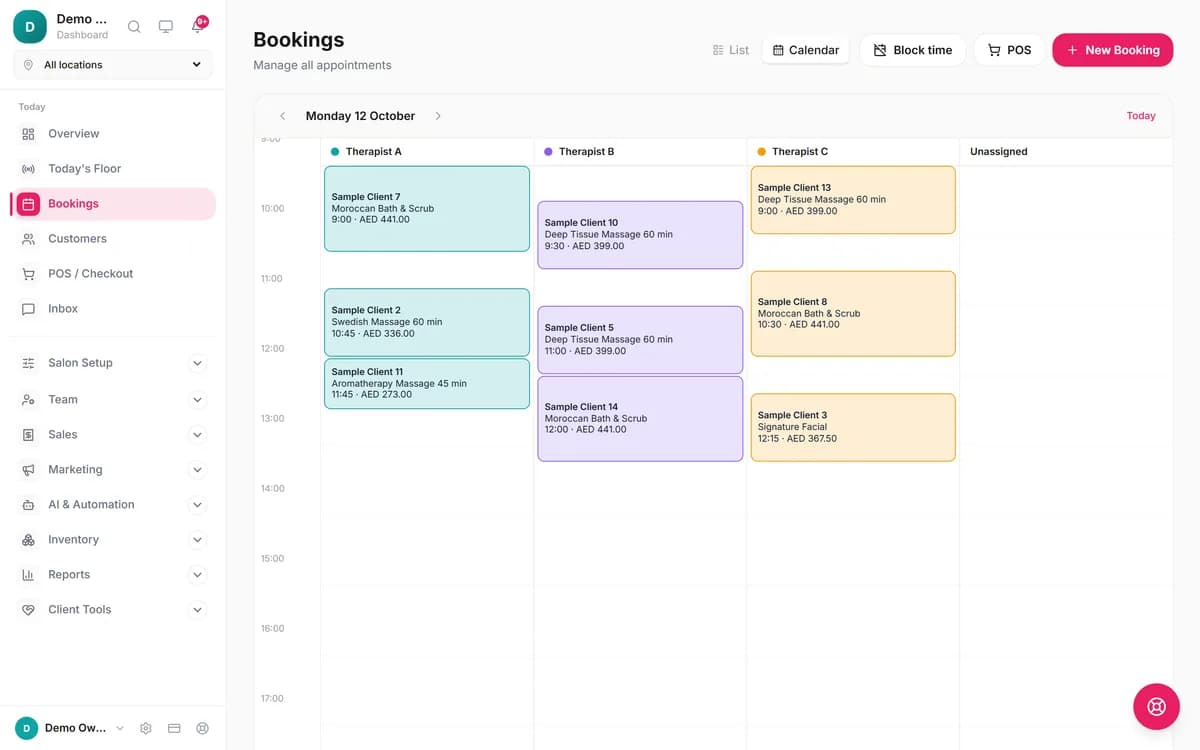
3. The right therapist, at the right time
Each therapist has their own calendar column, so you see who is free at a glance.
4. Concierge messages on WhatsApp
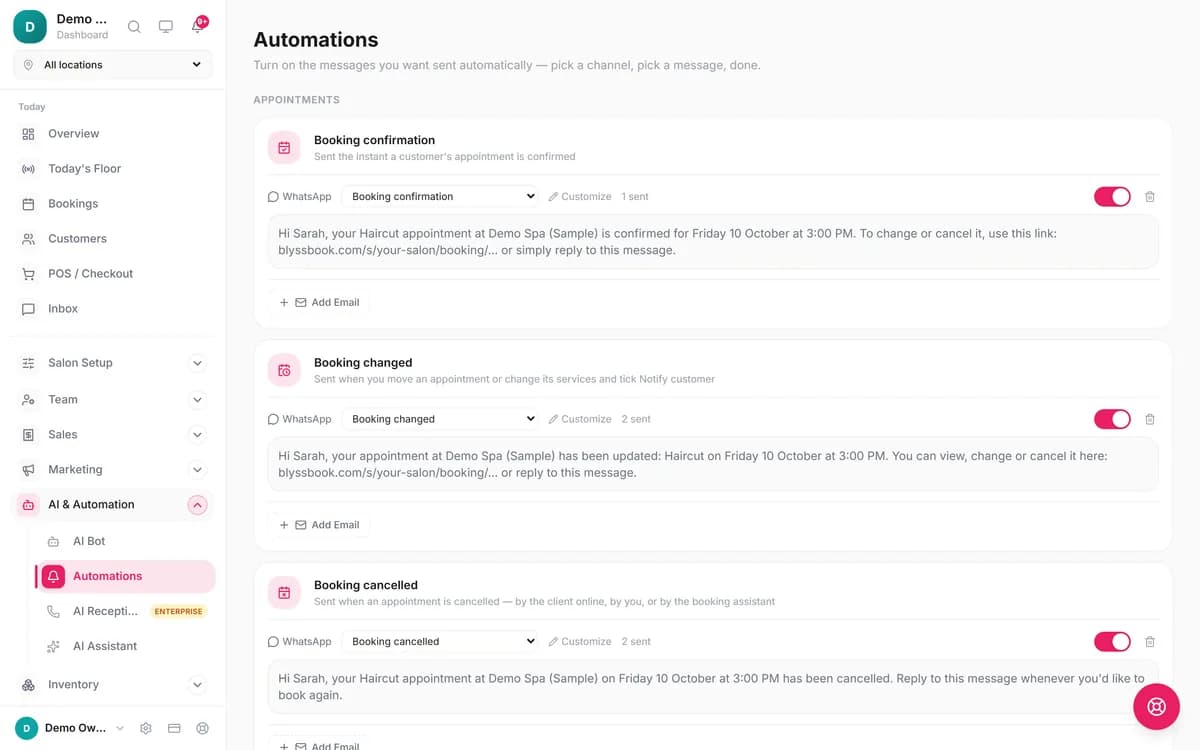
Confirmation, change and cancellation messages and the 24-hour and 2-hour reminders go out on WhatsApp, each with text you can edit. Clients reply in the same thread, and your team or the AI bot answers and books. You can try the WhatsApp AI bot before you sign up.
5. Memberships, packages and a second location
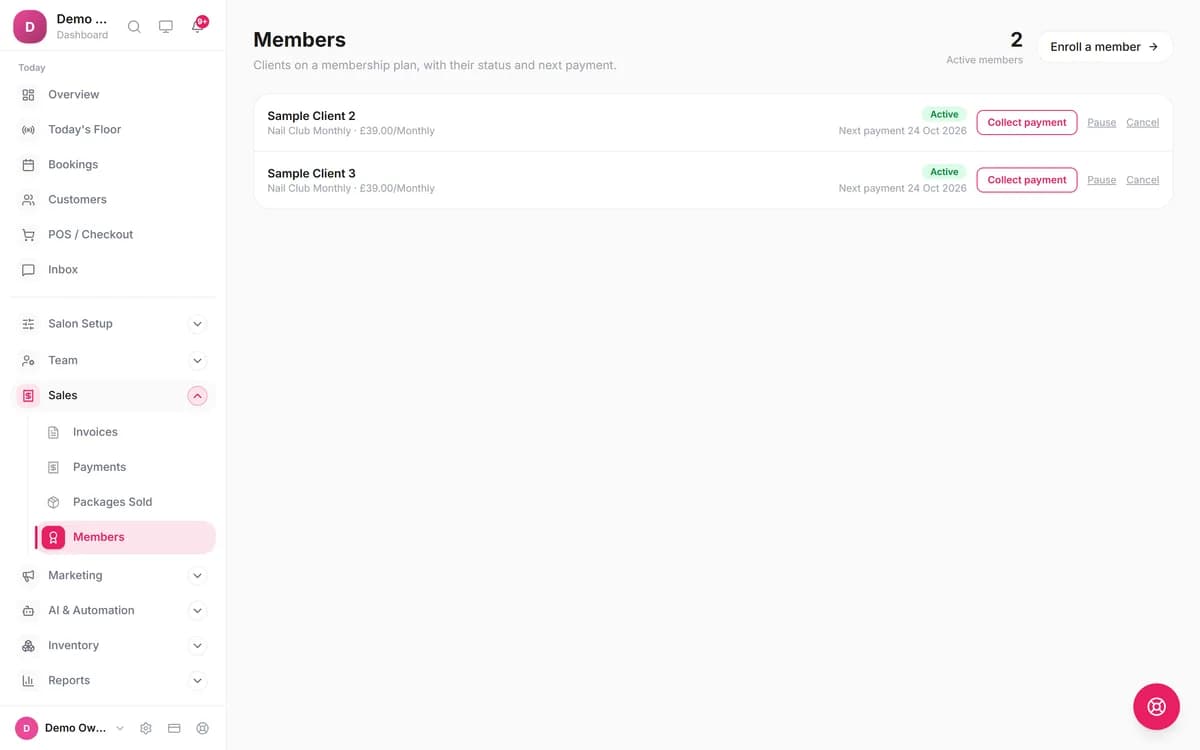
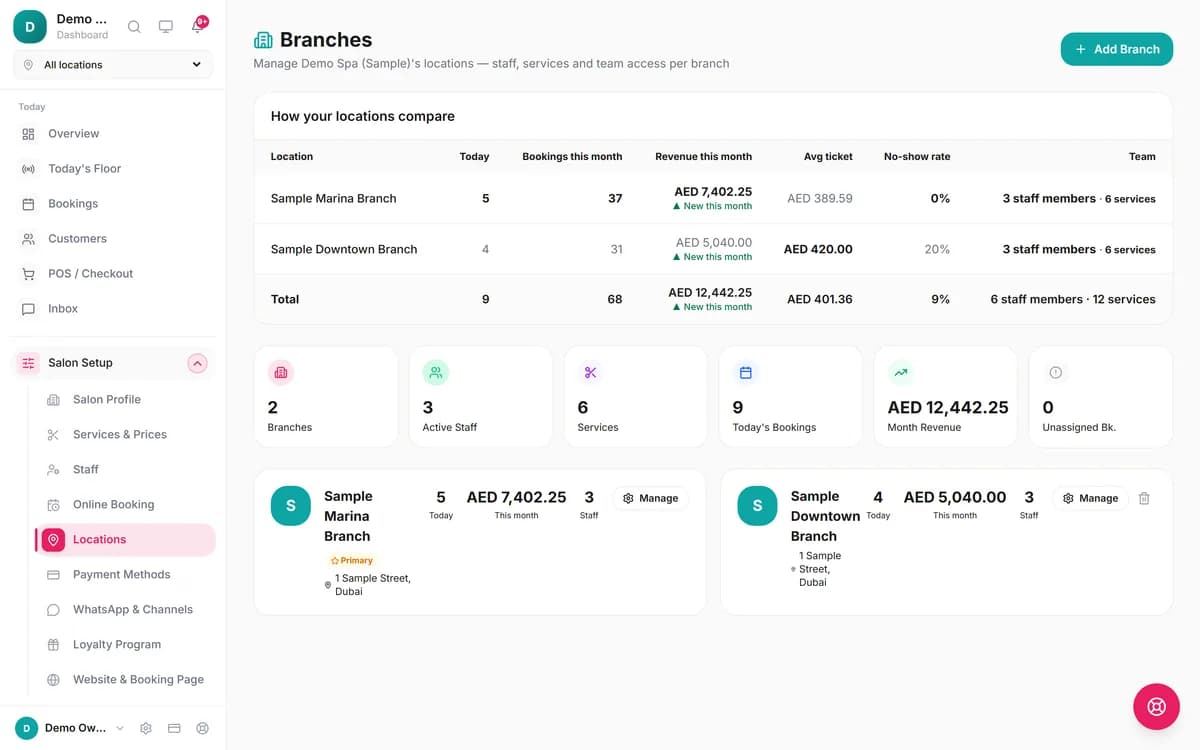
Sell a monthly membership or a prepaid package and see who is active and when each payment is next due. When you open a second salon, Enterprise puts both side by side with bookings, revenue and no-show rate.
When is Booker the better choice?
- You book rooms and equipment. Booker schedules rooms and equipment.[1] Blyssbook has one calendar column per staff member and no room or resource booking, so a spa with shared treatment rooms would have to manage them by hand.
- You sell gift cards. Booker includes them in its POS.[1] Blyssbook has none.
- Your clients expect texts from the tool itself. Booker sends text reminders on its published plans and two-way texting on Ultimate.[2] Blyssbook can send text reminders too, but through your own Twilio or Telnyx account, and it includes no texts or two-way texting of its own.
- You want new clients from a marketplace. Booker can list you in the Mindbody app.[3] Blyssbook doesn't have a consumer app with that reach.
- You want someone else to move your data. Booker lists data migration support and 1-on-1 setup.[2] Blyssbook's import is self-serve, with help by email or WhatsApp; dedicated onboarding is Enterprise only.
What Blyssbook doesn't do (yet)
- No gift cards and no room or equipment calendar.
- No offline mode. It runs in the browser and on Android, and needs a data connection.
- No automated reminders on Starter. Reminders, deposits, memberships and commissions start on Professional.
- Plan caps: Professional allows one branch, 15 staff, 2,000 clients and 1,000 bookings a month. A large Booker client list needs Enterprise, which has no client, staff or booking cap.
- Blyssbook doesn't cap WhatsApp messages, but Meta may bill its own fees for template messages such as reminders on your WhatsApp Business account.
- Online card payments only through your own Stripe account. No built-in card processing.
- No online consultation forms for clients to fill in before a visit. Keep using paper or your current forms tool.
- The AI phone receptionist is Enterprise only and in beta, and the number and minutes are paid separately. See the AI receptionist page.
How do you switch from Booker to Blyssbook?
Plan on two weeks: a day to set up, then a parallel run while your existing Booker appointments play out.
- Export clients from Booker. A published guide from another vendor gives the path: Customers → Manage Customers → View All Customers → Export to a .CSV file, then download it from Customer Exports. Appointments come out of Find Appointment with a saved view.[5] This is a third-party guide, not Booker's own documentation, so ask Booker support if your screens differ.
- Import into Blyssbook. In Customers → Import clients, upload the CSV. It matches common column names and brings in contact details, birthday, notes, tags, lifetime spend, visit and no-show counts, last visit and marketing consent. Check the preview, then confirm.
- Rebuild services, staff and commissions. Add your menu with prices and durations, your team, and a commission rule per person under Team → Commissions.
- Re-enter future appointments. The import brings clients, not bookings. Add the next two weeks by hand, or let them run out in Booker.
- Honor gift cards and memberships. Blyssbook has no gift cards, so keep a list of open balances and apply them as a discount at checkout. Re-create membership plans and enroll members under Sales → Members.
- Run both for two weeks, then swap the booking link on your website, Instagram and Google profile, and cancel Booker once the last old appointment has passed.
Questions people ask about replacing Booker
What is the best alternative to Booker software for premium salons?
It depends on your size. For a large spa group, Boulevard (from $143 a month) and Zenoti (quote only) are closer like-for-like options, and if you rely on room and equipment scheduling, staying on Booker may be simplest. For one to ten premium salons that want deposits, memberships, commissions and WhatsApp messaging at a published price, Blyssbook is $21 a month on Professional or $49 on Enterprise.
Is Booker still available, and is it part of Mindbody?
Yes. As of 13 October 2026, booker.com still sells Booker, with a Mindbody copyright footer. Since June 2025 Mindbody, Booker and ClassPass sit under a parent brand, Playlist, which said their products would not change.
Can I export my client list from Booker?
Yes, as a CSV, according to a published import guide from another vendor (the steps are in the switching section above). We haven't checked Booker's own help pages, which sit behind Mindbody's support login, so ask Booker support if your screens differ.
Is Blyssbook cheaper than Booker?
On list price, yes. Booker's pricing page says it starts at $139 and doesn't show prices for its higher plans. Blyssbook is $11, $21 or $49 a month, and the $49 Enterprise plan covers up to 10 branches. Booker includes things Blyssbook doesn't have, such as gift cards and room booking, so compare the features you'll actually use.
Does Blyssbook take deposits like Booker?
Yes, on Professional and Enterprise, through your own Stripe account. The slot is held for 30 minutes while the client pays, and the booking confirms only once Stripe confirms the payment. Blyssbook has no card processing of its own.
Moving from another system? See the Salon Ultimate alternative comparison, or Blyssbook for spas.
Try Blyssbook free for 14 days
No card needed. Import your Booker client list and set up deposits in an afternoon.
By Sam Rahman, Salon Operations & Content · Updated 13 October 2026 · Competitor facts checked 13 October 2026
Written by Sam Rahman from Blyssbook setups and product testing. Product facts checked against the live app on 13 October 2026. Competitor facts are from each vendor's public pages on 13 October 2026 (sources below).
Sources
- [1] Booker home page (features, footer): https://www.booker.com/, checked 13 October 2026.
- [2] Booker pricing page: https://www.booker.com/pricing, checked 13 October 2026.
- [3] Booker spa software page: https://www.booker.com/spa-software, checked 13 October 2026.
- [4] Playlist press release, 4 June 2025: https://www.playlist.com/press/introducing-playlist-next-generation-platform-wellness-experiences, checked 13 October 2026.
- [5] Goldie help article, Importing from Booker (third-party guide): https://support.heygoldie.com/en/support/solutions/articles/23000027539, checked 13 October 2026.
- [6] Boulevard pricing page: https://www.joinblvd.com/pricing, checked 13 October 2026.
Booker, Mindbody, ClassPass, Playlist, Boulevard, Zenoti and Stripe are trademarks of their owners and are mentioned only to compare products. Blyssbook is not affiliated with them.