

Salon Ultimate alternative: compare prices, features and how to switch
SalonUltimate (as the vendor writes it) costs $159 a month for one store and $199 per location for chains.[2] It is built for walk-in salons and franchises, so stay if you rely on self check-in and live wait times. If you mainly book appointments, Blyssbook Professional is $21 a month with WhatsApp reminders, or $49 for up to 10 branches. The trial is 14 days, no card.
Is Salon Ultimate desktop software?
No. It is often grouped with older desktop salon systems, but SalonUltimate describes remote access to every store's data from anywhere,[5] and a 2023 announcement called it "Software as a Service", powered by BookedBy, its online booking and walk-in queuing engine.[7] So moving to Blyssbook is not a move from desktop to cloud. The real differences are price, messaging channel and how walk-ins are handled.
What does Salon Ultimate do well?
- Walk-in volume. Self check-in, live wait times for walk-ins and guided or self check-out.[4] Sport Clips chose it in 2023 for an exclusive seven-year deal covering its roughly 1,900 stores.[7]
- Franchise control. Set services, prices, memberships and inventory centrally and push them to every store, with role-based access.[5]
- Reach. Google Reserve on its booking table,[2] and a branded app for your business.[4]
- Support. Unlimited phone, email and text support and training on every plan.[2]
Why do salons look for an alternative to Salon Ultimate?
The first difference is cost, if you aren't using the walk-in and franchise tools. One store on SalonUltimate is $159 a month; Blyssbook Professional is $21, a difference of $1,656 a year. Three stores on the multi-location plan come to $597 a month,[2] against $49 for Blyssbook Enterprise, which covers up to 10 branches.
Messaging is the second. SalonUltimate sends reminders by SMS and email,[3] and charges $0.03 for each text beyond the allowance.[2] Its pages don't mention WhatsApp. If your clients answer WhatsApp faster than SMS, Blyssbook sends confirmations and the 24-hour and 2-hour reminders there, and your Blyssbook plan doesn't cap the number of WhatsApp messages. Meta may still bill its own fees for template messages such as reminders on your WhatsApp Business account, so the per-message cost isn't always zero.
The home page also shows a cheaper BookedBy on Clover plan at $69 per location a month,[1] but the pricing page doesn't list a price for it, so confirm it with their sales team.
How does Blyssbook compare with Salon Ultimate?
| SalonUltimate (as of Oct 2026) | Blyssbook | |
|---|---|---|
| How it runs | Software as a service with remote access to every store[5][7] | Cloud app in the browser, plus an Android staff app |
| Price | $159 a month for one store; $199 per location a month for multi-location[2] | $11, $21 or $49 a month; $49 covers up to 10 branches |
| Online booking | Yes, plus Google Reserve[2] | Yes, on your own booking page (custom domain on Professional) |
| Client app | Branded custom app[4] | No client app. Booking page works on any phone |
| Reminders | SMS and email, two-way confirmations[3]; $0.03 per extra text[2] | WhatsApp and email, 24-hour and 2-hour (Professional and up). SMS through your own Twilio or Telnyx |
| Walk-ins | Self check-in, live wait times[4] | Walk-in queue in the dashboard (Enterprise) |
| POS | Guided and self check-out[1] | POS with tips and split payments on every plan |
| Payroll and commission | Payroll setup, employee scheduling[2] | Commission rules, tips and pay runs (Professional and up) |
| Memberships | Yes, billed weekly or monthly, redeemable across stores[6] | Memberships and packages (Professional and up) |
| Multi-location | Central management, push changes to every store[5] | Up to 10 branches with side-by-side reports (Enterprise) |
| Reports | "100+ reports"[2] | Analytics dashboard, invoices, payroll and CSV export |
| Support | Unlimited phone, email and text[2] | Email and WhatsApp |
| Contract and trial | Not stated on the pricing page[2] | Month to month; 14-day trial, no card |
"Not stated" means the public page doesn't say. SalonUltimate's feature table doesn't label which plan each tick belongs to, so we haven't split features by plan.
What does a day in Blyssbook look like?
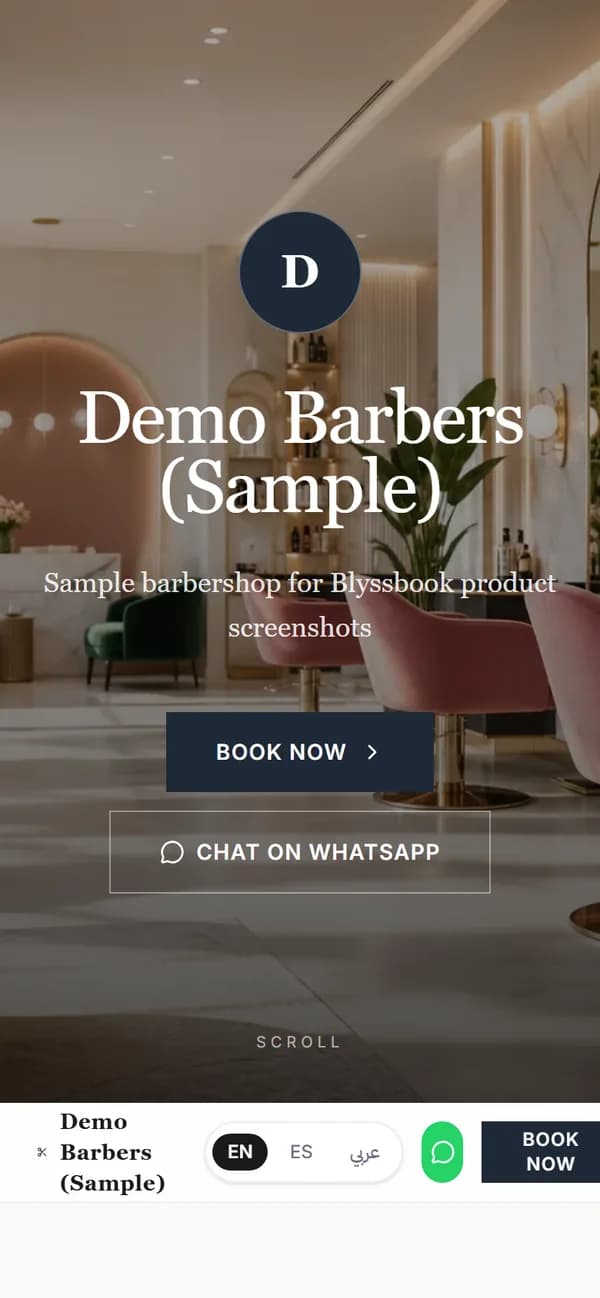
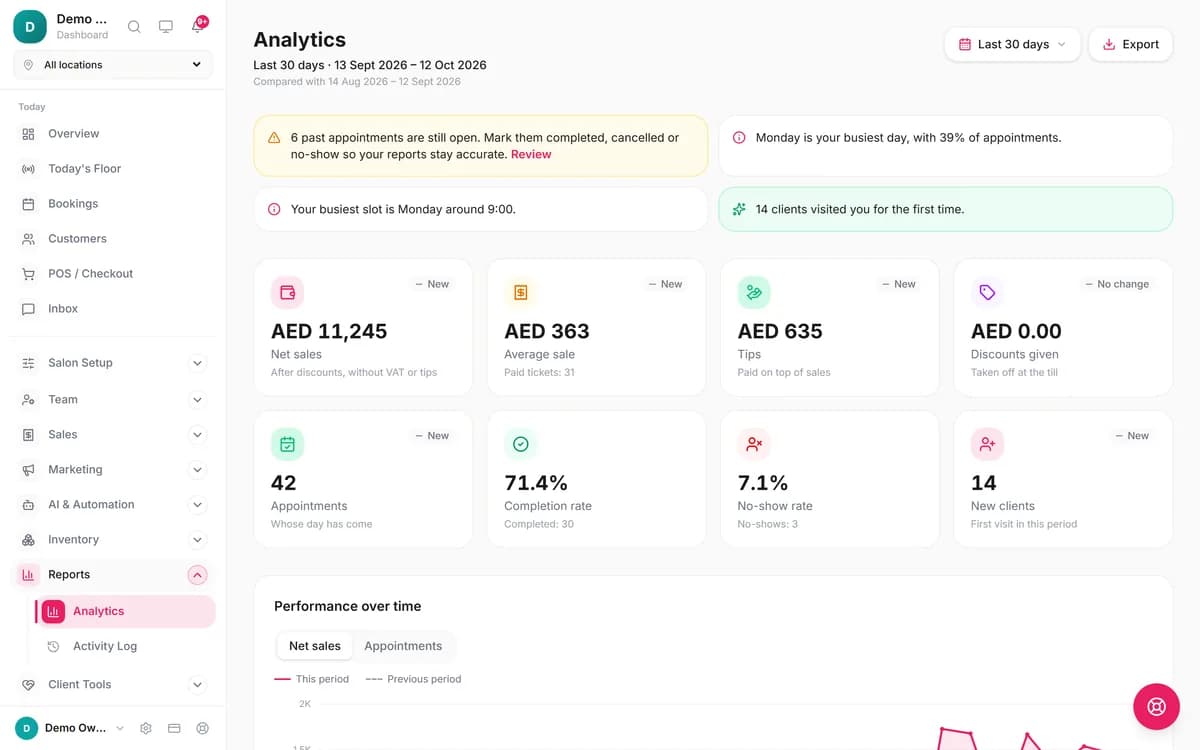
Clients book from your page on their phone or message you on WhatsApp. These screens are from demo salons we set up in the live product.
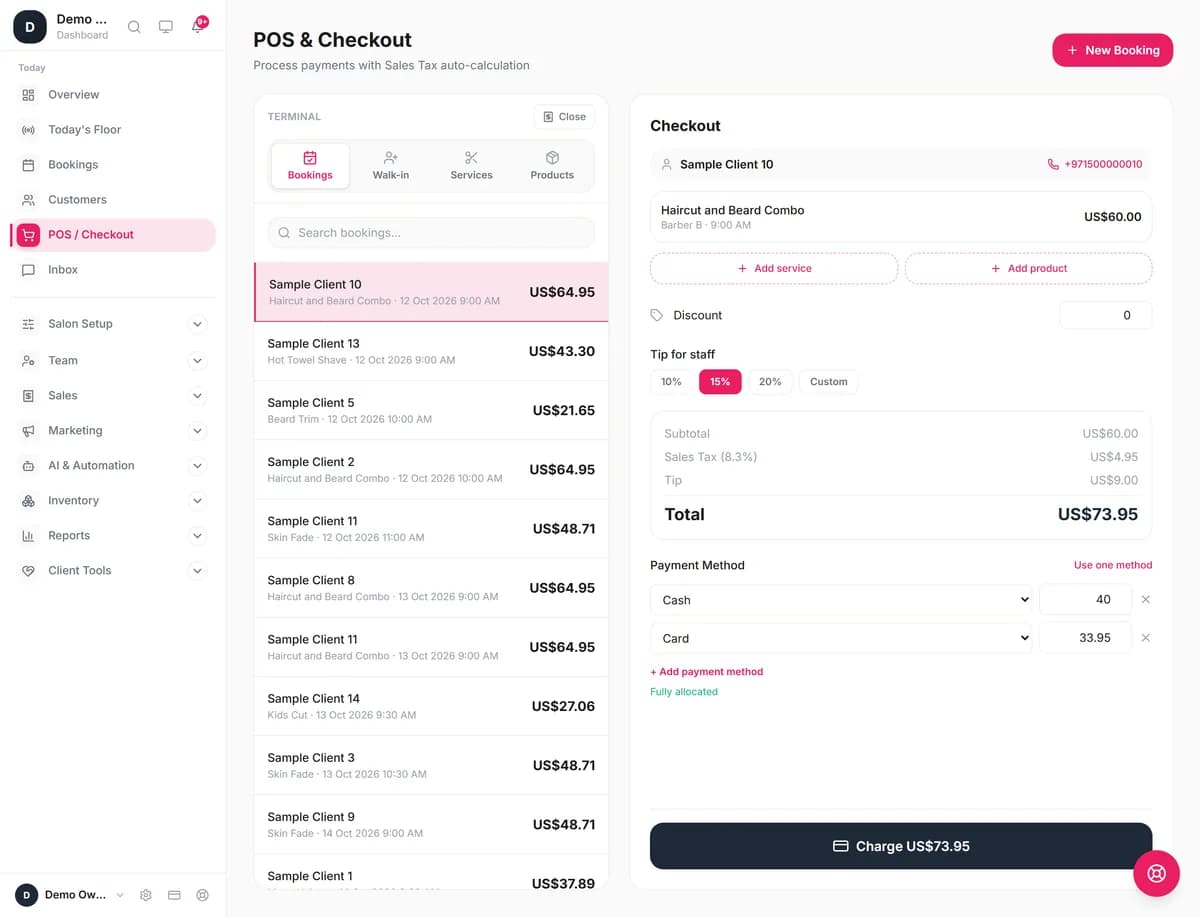
At the desk, the POS pulls the booking, adds the tip as a percentage and splits the bill between cash and card. Tips land on the stylist's pay line. The POS is on every plan, including Starter at $11.
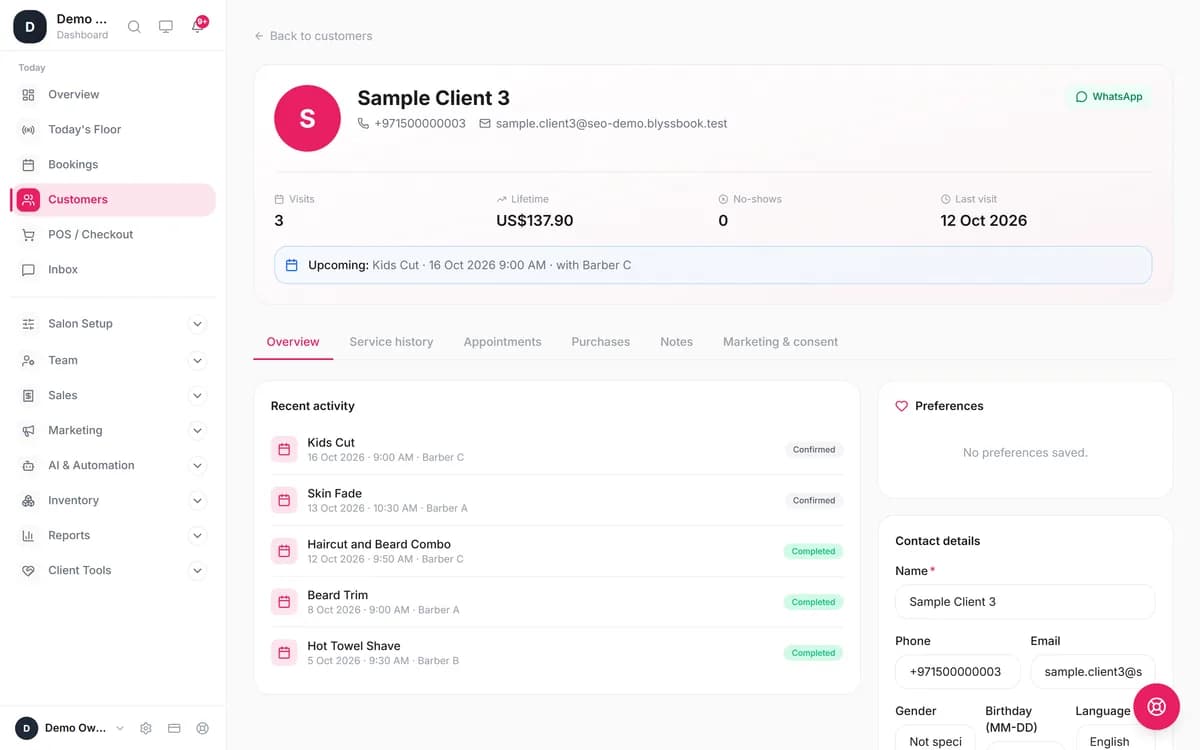
Each client profile keeps visits, lifetime spend, no-shows and service history, and these are the same fields the import fills when you move your list across.
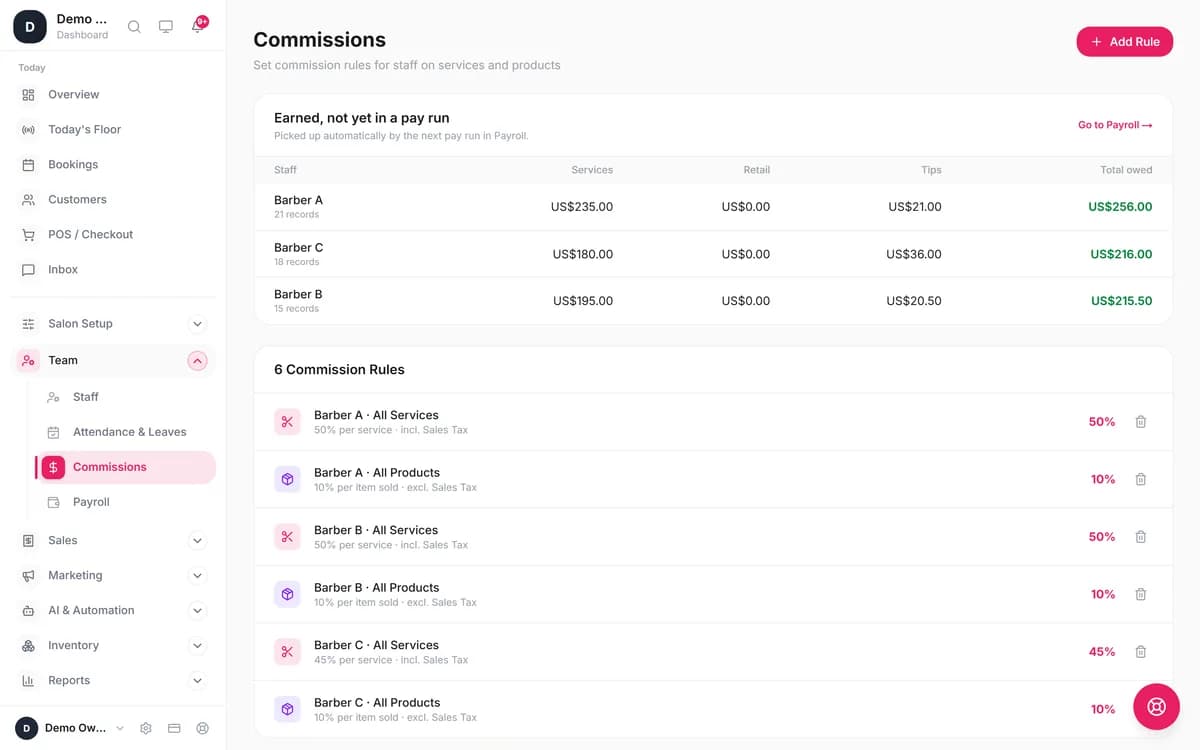
Commission rules are set per person and per service or product. What each stylist has earned shows before you run payroll. Read more on Blyssbook for hair salons and Blyssbook for barbershops.
When is Salon Ultimate the better choice?
- You run a high-volume walk-in shop. Self check-in kiosks and live wait times are central to SalonUltimate.[4] Blyssbook has a walk-in queue and a self check-in page on Enterprise, but no live wait-time display for clients.
- You run or join a franchise. Pushing one price change to every store, central memberships redeemable anywhere, and role-based access are built for that.[5][6] Blyssbook stops at 10 branches.
- Your clients expect texts built in, or you want Google Reserve and a branded app. Blyssbook sends texts only through your own Twilio or Telnyx account and has no Google Reserve or branded app.
- You want phone support. SalonUltimate offers unlimited phone support.[2] Blyssbook supports you by email and WhatsApp.
What Blyssbook doesn't do (yet)
- No gift cards, no branded client app and no Google Reserve.
- No offline mode. You need a data connection.
- No automated reminders on Starter. Reminders, memberships and commissions start on Professional.
- Plan caps: Professional allows one branch, 15 staff, 2,000 clients and 1,000 bookings a month. Enterprise has no client, staff or booking cap.
- Online card payments only through your own Stripe account.
- Past appointments don't import line by line; client summaries do.
- The AI phone receptionist is Enterprise only and in beta, with the number and minutes paid separately. See the AI receptionist page.
How do you switch from Salon Ultimate to Blyssbook?
We couldn't find a public export guide from SalonUltimate, so start by asking their support (support@salonultimate.com) for a CSV of your clients with the columns below. Then import it under Customers → Import clients. The importer recognizes common header names, and you can match any it misses by hand.
| Ask for this column | Where it lands in Blyssbook |
|---|---|
| First and last name | Client name |
| Mobile phone | Mobile number, standardized to international format (+1 for US salons) |
| Birthday | Date of birth (day and month only) |
| Client notes, formulas | Notes |
| Client type or group | Tags |
| Total spent | Lifetime spend |
| Number of visits, no-shows | Visits, No-shows |
| Last visit date | Last visit |
| Marketing opt-in | Marketing consent |
- Import clients and check the preview before you confirm.
- Add services, staff and commission rules under Team → Commissions.
- Write down open gift-card balances and prepaid sessions per client, add them as a note on the client profile, and honor them with the Discount field at checkout.
- Connect WhatsApp under Salon Setup → WhatsApp & Channels and switch on reminders under AI & Automation → Automations.
- Run both systems for two weeks, then change the booking link on your website and social profiles.
What other Salon Ultimate alternatives are worth a look?
- Booker (Mindbody) starts at $139 and includes text reminders.[8] See our Booker alternative comparison.
- Vagaro starts at $30 a month for one location (an offer of $23.99 for the first six months), plus $10 for each additional bookable calendar.[9] See Blyssbook vs Vagaro.
Questions about leaving Salon Ultimate
What's the best alternative to Salon Ultimate?
It depends on how your salon runs. A walk-in barbershop chain or franchise that relies on self check-in and live wait times may be best served by staying. An independent salon that mainly books appointments and wants WhatsApp reminders can run on Blyssbook Professional for $21 a month. If you want text reminders built in, Booker includes them on its published plans; Blyssbook can send them through your own Twilio or Telnyx account.
Can I import my Salon Ultimate client history?
You can import each client's details and summary history: name, mobile, email, birthday, notes, tags, lifetime spend, visit count, no-shows and last visit date. Ask SalonUltimate support for a CSV of your clients; we couldn't find a public export guide. Individual past appointments don't import line by line, so keep your old export as a record.
Is cloud salon software safe for client data?
Blyssbook runs on a server we manage, with a PostgreSQL database that is backed up every day. Staff members can each have their own login instead of sharing one password. We don't hold security certifications such as SOC 2, so if your franchise agreement requires one, ask any vendor for its certificate before you sign.
What happens to gift-card balances when I switch?
Blyssbook doesn't sell or track gift cards. Before you switch, export or write down every open balance with the client's name. Add a note to each client's profile in Blyssbook, and when they redeem, take the amount off at checkout with the Discount field. Once the old balances are used up, nothing else is needed.
How long does switching take?
Setup takes about a day: import the client CSV, add services, staff and commission rules, and publish your booking page. Then run both systems for about two weeks, so bookings already made in Salon Ultimate play out while new ones come into Blyssbook. Check your Salon Ultimate contract for notice terms; its pricing page doesn't state them.
Try Blyssbook free for 14 days
No card needed. Import your client list and take your first booking the same day.
By Sam Rahman, Salon Operations & Content · Updated 13 October 2026 · Competitor facts checked 13 October 2026
Written by Sam Rahman from Blyssbook setups and product testing. Product facts checked against the live app on 13 October 2026. Competitor facts are from each vendor's public pages on 13 October 2026 (sources below).
Sources
- [1] SalonUltimate home page (features, plans): https://www.salonultimate.com/, checked 13 October 2026.
- [2] SalonUltimate pricing page: https://www.salonultimate.com/pricing, checked 13 October 2026.
- [3] SalonUltimate notifications feature page: https://www.salonultimate.com/features/notifications, checked 13 October 2026.
- [4] SalonUltimate wait times feature page: https://www.salonultimate.com/features/wait-times, checked 13 October 2026.
- [5] SalonUltimate central management feature page: https://www.salonultimate.com/features/central-management, checked 13 October 2026.
- [6] SalonUltimate memberships feature page: https://www.salonultimate.com/features/memberships, checked 13 October 2026.
- [7] Salon Today, Sport Clips and SalonUltimate partnership, 16 March 2023: https://www.salontoday.com/news/sport-clips-haircuts-and-salonultimate-announce-software-partnership, checked 13 October 2026.
- [8] Booker pricing page: https://www.booker.com/pricing, checked 13 October 2026.
- [9] Vagaro pricing page: https://www.vagaro.com/pro/pricing, checked 13 October 2026.
SalonUltimate, BookedBy, Clover, Sport Clips, Booker, Mindbody, Vagaro, Google and Stripe are trademarks of their owners and are mentioned only to compare products. Blyssbook is not affiliated with them.