

Multi-location salon software
One client list for every branch
Run two to ten locations from one account, $49 a month on Enterprise whether you have two branches or ten. Clients keep their packages and points at every branch, and reports show one branch or all of them.
- $49 a month for up to 10 branches
- 14 days free, no card
- No commission
What salon software scales best from one location to several?
The one where the second site is a settings change rather than a migration. In Blyssbook you start on any plan with one branch, then move to Enterprise when the second site opens. Your clients, history and bookings stay where they are. The table lists what a growing owner should check and what Blyssbook does about each.
| What to check | Blyssbook |
|---|---|
| One client list across sites | Yes. Client records have no branch. Packages, memberships and loyalty points follow the client to any branch. |
| Staff at more than one site | Yes, with separate working hours per branch and one calendar per person. |
| Different services and prices per branch | Yes. Pick which services each branch offers and set a branch price where it differs. |
| Stock per branch | Yes, plus stock transfers you dispatch from one branch and receive at the other. |
| Branch managers who see only their branch | Yes. Limit a team member to chosen branches. |
| Reports per branch and combined | Yes. A branch switcher scopes the dashboard, and a comparison table ranks locations. |
| Price per extra site | None. One Enterprise price covers up to 10 branches. |
What is the best salon software for salons with 10 or more staff?
Pick by staff cap and by what you need to run people. Starter allows 5 staff and Professional 15. Enterprise has unlimited staff. Ten or more staff is the point where you want roles, so the front desk can take bookings without seeing payroll, and commissions that calculate themselves.
Roles (Owner, Manager, Receptionist, Stylist/Therapist and custom ones), service and product commissions, tips on the payroll line and a pay run you approve are on Professional and Enterprise. A stylist role sees only their own diary, clients and earnings. Details are on the salon POS page and in the Team section of the app. Starter doesn't include commissions or payroll.
How do you open a second branch in Blyssbook?
- Upgrade to Enterprise under Billing. The Branches page is locked on other plans, and a salon that downgrades keeps the branches it already has but can't add more.
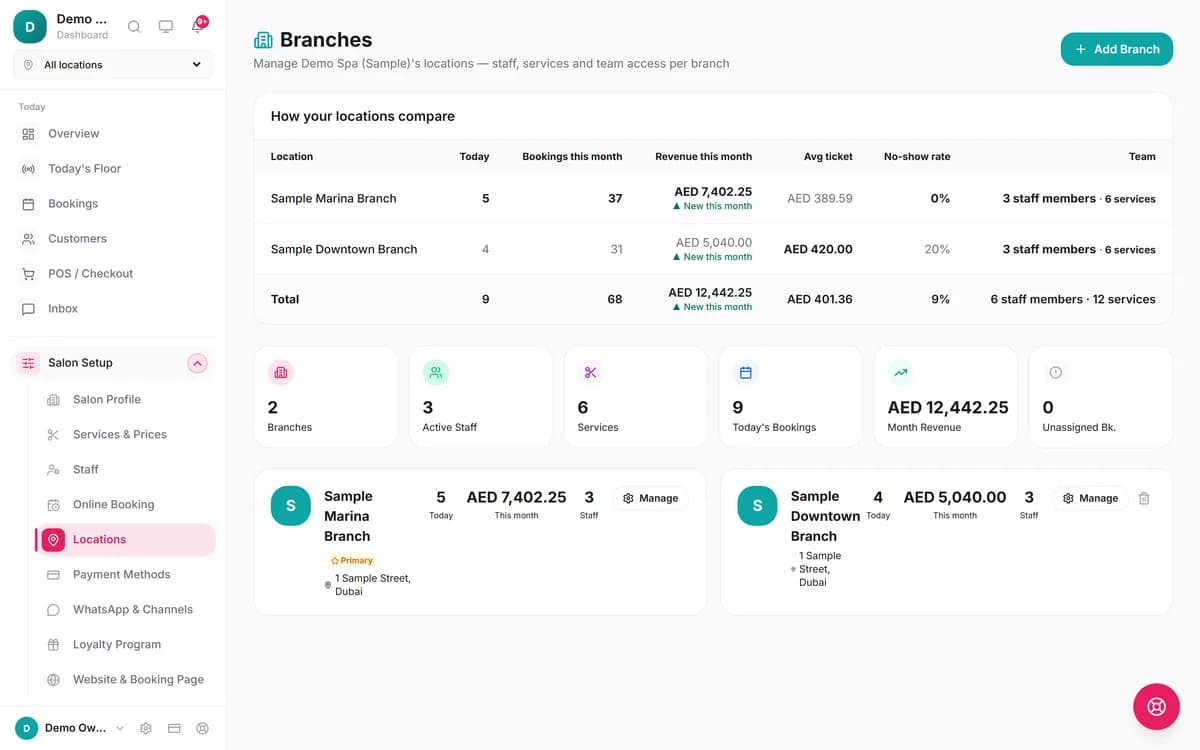
- Open Salon Setup → Locations and press Add Branch. Enter the name, address, phone and time zone. Choose Copy setup from an existing branch to bring over its services and prices, staff, opening hours and receipt and tax settings. The invoice prefix is left blank on purpose.
- Press Manage on the new branch to add staff and services, and to set an invoice prefix (for example MAR, giving MAR-1001) if each site keeps its own number series.
- Give a manager access: in the Team access screen, invite or edit a member and choose their branches.
- Check the booking page. With two active branches, clients first see Choose a location, then that branch's services, prices and staff.
A person who works at both sites is assigned to both and can have different hours at each. Their calendar stays one calendar, so a booking at one branch blocks the same time at the other. Blyssbook has no travel-time setting between sites, so leave a gap in their hours if they commute.
What multi-location reporting does Blyssbook have?
The sidebar has a location switcher with All locations and each branch. It scopes the overview, the calendar, the floor view, invoices, stock and the analytics reports. On the Branches page the table above compares locations by bookings, revenue, average ticket and no-show rate for the month, with a total row. The Analytics report also shows net sales, tickets and appointments per branch when you view all locations.
Managing commissions across multiple locations
Commission rules belong to the person, not the branch. Each commission record is stamped with the branch where the sale happened. In Team → Payroll a stylist who works at both sites has one pay line, with a breakdown by branch. Pay runs have no branch field, so they cover the whole business and can't be run by a manager limited to one branch.
How much does it cost at 1, 3, 5 and 10 branches?
Blyssbook charges per account, not per branch. See the pricing page for the plans.
| Branches | Plan | USD | AED | SAR | INR |
|---|---|---|---|---|---|
| 1 | Professional | $21 | 79 | 79 | 1,999 |
| 1 | Enterprise | $49 | 179 | 184 | 4,699 |
| 3 | Enterprise | $49 | 179 | 184 | 4,699 |
| 5 | Enterprise | $49 | 179 | 184 | 4,699 |
| 10 | Enterprise | $49 | 179 | 184 | 4,699 |
Monthly prices. Yearly billing is ten times the monthly price. The 14-day trial needs no card.
What enterprise salon software supports multiple locations, and how do they compare?
Most of the big names do. The difference is how they charge and how far they go. This is what each vendor's own pricing page said on 16 October 2026.
| Software | Multi-location pricing, as listed |
|---|---|
| Blyssbook | $49 a month flat, up to 10 branches |
| Zenoti[1] | "Customized based on your footprint and needs"; no prices listed, quote only |
| Boulevard[2] | Premier $234 and Prestige $328 a month per location (fall offer for new customers, normally $293 and $410); Essentials is one location; Enterprise by consultation |
| Vagaro[3] | $23.99 a month for one location (an exclusive rate for the first 6 months; the page also shows $30.00), plus $10 per extra bookable calendar up to seven; multiple locations on an "à la carte" model with no added multi-location fees |
| Mindbody[4] | "Starting at $99 USD/month per location" (its FAQ says $79); prices rise with each new location |
| Phorest[5] | "Multi-Locations Supported"; quote only, no plan prices listed |
Multiplying Boulevard's Premier price gives $702 a month for three locations and $2,340 for ten, against $49 for Blyssbook. The plans are not like for like, so compare the feature lists before you decide. Blyssbook's strengths are the price and WhatsApp booking.
Where they are stronger
- Zenoti describes serving "single locations to enterprise franchises" and links to a franchise offering[1]. Blyssbook has no franchise royalty or franchisee tooling, and stops at 10 branches.
- Mindbody and Zenoti both sell enterprise and franchise plans by quote[1][4]. If you are planning 50 sites, that conversation matters more than the price of a small plan.
- Vagaro says it adds no multi-location fees[3], which is a fair point if your sites are small and need few calendars. Its cost grows with each extra bookable calendar instead.
- Mindbody advertises memberships that bill automatically[4]. Blyssbook memberships don't (see memberships and packages).
What does Blyssbook's multi-location feature not do?
- 10 branches per account. The plan limit is 10; if you need more, ask us.
- No franchise royalty, franchisee billing or head-office rollup across separate accounts. Separate Blyssbook accounts are not linked.
- No travel-time setting between sites for staff who work at both.
- Pay runs are whole-business. Reports and sales can be split by branch; the pay run itself can't.
- No separate room or resource calendar. The calendar is one column per staff member.
- Everything above needs Enterprise. Professional and Starter are one branch each.
Multi-location questions
What salon software scales best from a single location to multiple sites?
Look for one that keeps a single client list, lets you set up a new site by copying the first, and doesn't raise the price per site. Blyssbook's Enterprise plan ($49 a month) covers up to 10 branches with one client list and a "Copy setup from" option. Start on Starter or Professional with one site and upgrade when the second opens.
What salon software is best for salons with 10 or more staff?
Check the staff cap first. Blyssbook Starter allows 5 staff and Professional ($21 a month) 15. Enterprise ($49) has unlimited staff. At that size you also want roles, commissions and a pay run you can approve. All three are in Professional and above.
What enterprise salon software supports multiple locations?
Zenoti, Mindbody, Boulevard, Vagaro and Phorest all list multi-location support, mostly on quote-based or per-location pricing. Blyssbook supports up to 10 locations on one $49 plan. It doesn't have franchise royalty tools, so large franchises should look at the bigger platforms.
Can clients book at any branch with one client record?
Yes. A client is one record for the whole business, whatever branch they visit. Once you have two active branches, the online booking flow starts with "Choose a location" and then shows that branch's services, prices and staff.
Can a stylist work at two branches?
Yes. A staff member can be assigned to several branches, with different working hours at each. Their calendar is one calendar, so a slot taken at one branch is not offered at the other. Blyssbook has no travel-time setting between sites.
How much does multi-location salon software cost per branch?
In Blyssbook it doesn't depend on the branch count: Enterprise is $49 a month for one branch or ten. Several competitors charge per location, for example Boulevard's Premier plan at $234 a month per location in its fall offer for new customers.
Can branch managers see only their own branch?
Yes, on Enterprise. You can limit a team member to chosen branches, and they only see calendars, clients' bookings, sales and stock for those. Pay runs cover the whole business, so only an owner (or someone the owner trusts with payroll) runs them.
Related features and guides
- PricingStarter, Professional and Enterprise with local-currency prices.
- Zenoti alternativeHow Blyssbook compares with Zenoti for spas and salons with several sites.
- Spa management softwareTreatments, packages and memberships for spas, including two-site setups.
- Memberships and packagesSell once, redeem at any branch.
- Salon POSCheckout, tips, split payments and per-branch invoice numbers.
- Booker alternativeA cheaper option for spas moving off Booker.
- Salon software in the UAEPrices in AED for salons and chains in the Gulf.
Try Blyssbook free for 14 days
No card needed. Set up your services, staff and booking page, then connect WhatsApp.
Start the free trialBy Sam Rahman, Salon Operations & Content · Updated 16 October 2026
Written by Sam Rahman from Blyssbook setups and product testing. The screen is from a fictional two-branch demo spa (sample data, 12 October 2026). Product facts checked against the app code and the plan table on 16 October 2026. Competitor facts are from their public pricing pages on 16 October 2026 (sources below).
Sources
- [1] Zenoti pricing page: https://www.zenoti.com/pricing, checked 16 October 2026.
- [2] Boulevard pricing page: https://www.joinblvd.com/pricing, checked 16 October 2026.
- [3] Vagaro pricing page: https://www.vagaro.com/pro/pricing, checked 16 October 2026.
- [4] Mindbody pricing page: https://www.mindbodyonline.com/business/pricing, checked 16 October 2026.
- [5] Phorest pricing page: https://www.phorest.com/us/pricing/, checked 16 October 2026.
Zenoti, Boulevard, Vagaro, Mindbody and Phorest are trademarks of their owners and are mentioned only to compare products. Blyssbook is not affiliated with them.